“Real-time” sounds more ambitious than it actually is. It’s not magic, and it doesn’t require expensive infrastructure — in many cases it comes down to picking the right communication mechanism for the problem in front of you. And that mechanism, more often than you’d think, is WebSockets.
An instant-messaging chat, a self-updating metrics dashboard, a logistics app where users watch their order status change live on screen: all of these share a need that traditional HTTP handles poorly. Not because HTTP is a bad technology, but because it was never designed for this. HTTP was built around the idea that the client asks and the server answers — not that the server speaks up whenever it has something to say.
In this article we’ll cover what WebSockets are, how they work under the hood, when it makes sense to use them and when it doesn’t, what alternatives exist, and how to build a working real-time order tracking example with Node.js and a plain web client.
When real-time stops being optional
Plenty of applications work perfectly fine with a classic request-response model: the user opens a page, the server sends the data, the screen shows the result. If the data changes, the user refreshes. That’s fine for a blog, a static store, or a contact form.
But it’s getting harder to find modern applications that fit exclusively within that model. Users expect things to happen without them doing anything: the message should arrive without hitting refresh, the order status should update on screen without a page reload, the metrics panel should reflect the latest numbers without anyone asking the server for them.
The most obvious solution — and historically the most common one — is polling: the client fires requests at the server on a set interval to check for changes.
	client → "anything new?" → server → "nope"
	client → "anything new?" → server → "nope"
	client → "anything new?" → server → "yes, here you go"
It works, but it has a cost. Short intervals generate dozens of requests per minute even when nothing changes. Long intervals mean information arrives late. Neither option is great when immediacy matters, and both add unnecessary load on the server and the network.
WebSockets solve this by changing the model entirely: instead of the client repeatedly asking, a persistent channel is established over which both client and server can talk at any time.
What WebSockets are and how they work
A WebSocket is a persistent, bidirectional connection between a client and a server. Once open, either end can send messages without waiting for the other to ask.
The connection starts with a handshake over HTTP. The client sends a special request with the Upgrade: websocket
header, the server responds with 101 Switching Protocols, and from that point on the connection is no longer HTTP
— it becomes a WebSocket channel over the same underlying TCP connection.
	GET /chat HTTP/1.1
	Host: example.com
	Upgrade: websocket
	Connection: Upgrade
	Sec-WebSocket-Key: dGhlIHNhbXBsZSBub25jZQ==
	Sec-WebSocket-Version: 13

	HTTP/1.1 101 Switching Protocols
	Upgrade: websocket
	Connection: Upgrade
	Sec-WebSocket-Accept: s3pPLMBiTxaQ9kYGzzhZRbK+xOo=
Once the handshake is done, the connection stays open. The server can push data to the client at any point, without waiting for a new request. The client can also send messages to the server whenever it needs to. Both directions work independently and simultaneously over the same connection.
That’s exactly what changes the nature of the problem: there’s no more asking whether something is new, because when it is, it arrives on its own.
What advantages WebSockets offer over other approaches
The benefits of WebSockets over polling or conventional HTTP requests become clear in scenarios where data changes frequently and latency matters:
- Lower latency: messages arrive the moment the server emits them, without waiting for the next polling cycle.
- Less redundant traffic: no constant requests coming back empty-handed. The connection stays open, but data only flows when there’s actually something to send.
- True bidirectionality: the client can talk to the server and the server can talk to the client independently, without either side having to wait its turn.
- Better user experience: the interface reflects the real state of the system in real time, without reloads or flickering.
That said, no technology is the right answer for everything. WebSockets add complexity — persistent connections, state management, reconnection logic — that isn’t always worth taking on.
When to use them, and when not to
The relevant question isn’t whether WebSockets are better than HTTP. It’s whether the problem you’re dealing with genuinely requires bidirectionality and sustained low latency.
Cases where they fit well:
- Chat and messaging: messages arrive the moment they’re sent, no polling needed.
- Metrics dashboards: values update in real time without reloading the page.
- Real-time tracking: logistics, deliveries, vehicle positions.
- Multiplayer games: syncing state between players with minimal latency.
- Collaborative editing: multiple users editing the same document and seeing each other’s changes as they happen.
- Support and online presence: knowing whether an agent is available or a user is typing.
- Push notifications in web apps: alerts that reach the user without them having to do anything.
Cases where they probably aren’t worth it:
- Apps with data that rarely changes or that users access on an occasional basis.
- Simple backends where polling every 30 seconds or Server-Sent Events already solve the problem with far less complexity.
- Scenarios where communication is mostly one-way (server to client only): SSE is a simpler and perfectly valid option there.
- Environments with proxy or infrastructure constraints where keeping long-lived connections open is problematic.
Alternatives to WebSockets
Before committing to WebSockets it’s worth knowing what other strategies exist and when they’re a better fit:
| Strategy | How it works | Latency | Bidirectional | Best for |
|---|---|---|---|---|
| Polling | Client asks every N seconds | High (depends on interval) | No | Infrequently changing data, no strict latency requirements |
| Long polling | Request stays open until the server has something to say | Medium | No | Fallback when SSE or WebSockets aren’t available |
| Server-Sent Events | Server pushes events over a kept-alive HTTP connection | Low | No (server → client only) | Notifications, feeds, dashboards where the client doesn’t need to send data |
| WebSockets | Persistent bidirectional channel | Very low | Yes | Chat, games, collaboration, real-time tracking |
The practical takeaway: WebSockets shine when you need bidirectionality and sustained low latency. If you only need the server to talk to the client, Server-Sent Events (SSE) is a simpler option with native browser support. And if data changes a handful of times a day, polling on a sensible interval is more than enough.
Integrating WebSockets into common technologies
Browser
The browser exposes a native API that needs no external library. You work directly with the WebSocket constructor
and the onopen, onmessage, onclose, and onerror event handlers:
	const ws = new WebSocket('ws://localhost:3000');

	ws.onopen    = () => console.log('Connected');
	ws.onmessage = (event) => console.log('Message:', event.data);
	ws.onclose   = () => console.log('Disconnected');
	ws.onerror   = (err) => console.error('Error:', err);

	ws.send(JSON.stringify({ type: 'greeting', content: 'Hello' }));
The ws object represents the connection. While it’s open, any call to ws.send() delivers data to the server,
and any message the server emits arrives through onmessage.
Node.js: ws vs Socket.IO
On the server side, the two most common options are ws and Socket.IO — but they’re not the same thing:
wsis a clean implementation of the WebSocket protocol itself. Lightweight, no custom protocol on top, no magic. What you send is what arrives. The right choice when you want full control and don’t need any extras.Socket.IOadds its own protocol layer on top of WebSocket (with automatic fallbacks, reconnection, rooms, namespaces, and named events). It’s more comfortable for complex applications, but both ends — client and server — must use the Socket.IO library. It’s not compatible with a native browser WebSocket client.
The example in this article uses ws so the client can be plain browser JavaScript with no dependencies.
Deployment considerations
In production, a few things come up that don’t appear during local development:
- Proxies and load balancers need to be configured to allow
Upgradeconnections. Nginx, for example, requires theproxy_http_version 1.1andproxy_set_header Upgrade $http_upgradedirectives. - Sticky sessions: if you’re running multiple server instances, a client must always connect to the same one — or you need a shared broker like Redis pub/sub to propagate messages across instances.
- Heartbeats: many proxies and cloud environments close idle connections after a timeout. A periodic ping/pong mechanism keeps the connection alive.
Good practices before writing code
Before opening your first WebSocket connection in a real project, it’s worth settling a few design decisions that will save you a lot of headaches later:
Define your event types clearly. A WebSocket message is just text or binary data. If you don’t give it structure,
you’ll end up with a channel where chaotic objects nobody knows how to interpret fly back and forth. A simple
convention like { type: string, payload: object, at: string } makes the code much easier to maintain.
Handle reconnection on the client. WebSocket connections drop: server restarts, network blips, proxy timeouts. The client should be responsible for reconnecting, ideally with exponential backoff to avoid hammering the server if there’s a widespread issue.
Authenticate at connection time. The initial handshake is HTTP, so you can pass a token in the query string or validate a session cookie. Once the connection is established, HTTP headers are no longer available, so authentication must happen before or in the first message.
Don’t flood the channel. Sending every state change for every entity to every connected client scales terribly. Filter what each client receives: only what’s relevant to them, only when something they care about actually changes.
Think about logging and debugging. With HTTP you can inspect each request independently. With WebSockets, traffic is a continuous stream. Logging connections, disconnections, and errors — and having some way to inspect messages during development — makes a real difference.
Practical example: real-time order tracking
To make all of the above concrete, we’ll build a Node.js server that pushes order status updates in real time and a web client that receives them and displays them as they arrive.
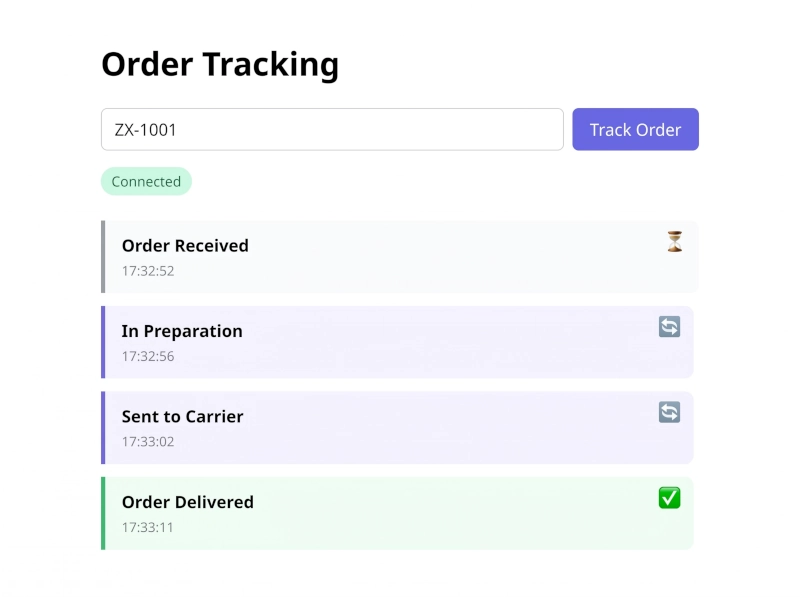
The scenario uses both directions of the channel. The server knows about several orders, each with its own sequence of
states. The client connects, the user enters an order code, and the client sends a track_order message to the
server. The server responds by emitting that order’s events one by one over a random interval of 3 to 10 seconds —
simulating the unpredictable pace of a real backend process. The user can switch to a different order at any point:
the server cancels the current cycle and starts the new one immediately.
Project structure
	order-tracker-ws/
	├── client/
	│   └── index.html
	├── package.json
	└── server.js
Backend with Node.js
First, install the only dependency:
	{
	  "name": "order-tracker-ws",
	  "version": "1.0.0",
	  "main": "server.js",
	  "scripts": { "start": "node server.js" },
	  "dependencies": { "ws": "^8.17.0" }
	}
npm install
The server defines a map of orders, each with its own event sequence. Rather than emitting automatically on connect,
it waits for a track_order message from the client. When one arrives, it cancels any ongoing cycle and starts a new
one for the requested order. If the code doesn’t exist, it sends back a structured error event so the client can
display it without any special-casing:
	const http = require('http');
	const { WebSocketServer } = require('ws');

	const ORDERS = {
	  'ZX-1001': [
	    { type: 'order_created',    label: 'Order received',  status: 'pending'   },
	    { type: 'order_processing', label: 'Processing',      status: 'active'    },
	    { type: 'order_sent',       label: 'Shipped',         status: 'active'    },
	    { type: 'order_delivered',  label: 'Delivered',       status: 'success'   },
	  ],
	  'ZX-1002': [
	    { type: 'order_created',    label: 'Order received',  status: 'pending'   },
	    { type: 'order_processing', label: 'Processing',      status: 'active'    },
	    { type: 'order_delayed',    label: 'Delivery delayed', status: 'warning'  },
	    { type: 'order_sent',       label: 'Shipped',         status: 'active'    },
	  ],
	  'ZX-1003': [
	    { type: 'order_created',    label: 'Order received',  status: 'pending'   },
	    { type: 'order_cancelled',  label: 'Cancelled by customer', status: 'cancelled' },
	  ],
	};

	const server = http.createServer();
	const wss = new WebSocketServer({ server });

	wss.on('connection', (ws) => {
	  console.log('Client connected. Total:', wss.clients.size);
	  let timer = null;

	  ws.on('message', (data) => {
	    const msg = JSON.parse(data.toString());
	    if (msg.type !== 'track_order') return;

	    if (timer) clearTimeout(timer);

	    const events = ORDERS[msg.orderId];
	    if (!events) {
	      ws.send(JSON.stringify({
	        type: 'error',
	        label: 'Order not found',
	        status: 'error',
	        orderId: msg.orderId,
	        at: new Date().toISOString(),
	      }));
	      return;
	    }

	    let step = 0;

	    const scheduleNext = () => {
	      if (step >= events.length) return;
	      const delay = Math.floor(Math.random() * 7000) + 3000;
	      timer = setTimeout(() => {
	        const event = events[step++];
	        ws.send(JSON.stringify({ ...event, orderId: msg.orderId, at: new Date().toISOString() }));
	        scheduleNext();
	      }, delay);
	    };

	    const firstEvent = events[step++];
	    ws.send(JSON.stringify({ ...firstEvent, orderId: msg.orderId, at: new Date().toISOString() }));
	    scheduleNext();
	  });

	  ws.on('close', () => {
	    if (timer) clearTimeout(timer);
	    console.log('Client disconnected. Total:', wss.clients.size);
	  });
	});

	server.listen(3000, () => {
	  console.log('Server listening at ws://localhost:3000');
	});
To start it:
npm start
Web client
The client is a single HTML file with plain JavaScript. No frameworks, no libraries, no bundler. It opens the
connection when the page loads and waits for the user to enter an order code. On submit, it clears the timeline and
sends { type: 'track_order', orderId } to the server. Events arrive through onmessage and are added to the
timeline as they come in. Not-found errors travel through the same path as any other message — the only difference
is the CSS class:
	<!DOCTYPE html>
	<html lang="en">
	<head>
	  <meta charset="UTF-8">
	  <title>Order tracking</title>
	  <style>
	    body {
	      font-family: system-ui, sans-serif;
	      max-width: 600px;
	      margin: 40px auto;
	      padding: 0 16px;
	    }
	    form { display: flex; gap: 8px; margin-bottom: 16px; }
	    input {
	      flex: 1;
	      padding: 8px 12px;
	      border: 1px solid #d1d5db;
	      border-radius: 6px;
	      font-size: 1rem;
	    }
	    button {
	      padding: 8px 16px;
	      background: #6366f1;
	      color: white;
	      border: none;
	      border-radius: 6px;
	      cursor: pointer;
	      font-size: 1rem;
	    }
	    button:hover { background: #4f46e5; }
	    #badge {
	      display: inline-block;
	      padding: 4px 10px;
	      border-radius: 12px;
	      font-size: 0.85rem;
	      margin-bottom: 24px;
	    }
	    .connected    { background: #d1fae5; color: #065f46; }
	    .disconnected { background: #fee2e2; color: #991b1b; }
	    .connecting   { background: #fef9c3; color: #854d0e; }
	    .event {
	      position: relative;
	      padding: 12px 40px 12px 16px;
	      border-left: 4px solid #d1d5db;
	      margin-bottom: 12px;
	      background: #f9fafb;
	      border-radius: 0 8px 8px 0;
	    }
	    .event .icon {
	      position: absolute;
	      top: 10px;
	      right: 12px;
	      font-size: 1.1rem;
	      line-height: 1;
	    }
	    .event.pending   { border-color: #9ca3af; background: #f9fafb; }
	    .event.active    { border-color: #6366f1; background: #f5f3ff; }
	    .event.success   { border-color: #22c55e; background: #f0fdf4; }
	    .event.warning   { border-color: #f59e0b; background: #fffbeb; }
	    .event.cancelled { border-color: #ef4444; background: #fef2f2; }
	    .event.error     { border-color: #ef4444; background: #fef2f2; }
	    .event small { color: #6b7280; font-size: 0.8rem; }
	  </style>
	</head>
	<body>
	  <h1>Order tracking</h1>

	  <form id="form">
	    <input id="orderInput" type="text" placeholder="ZX-1001" value="ZX-1001">
	    <button type="submit">Track order</button>
	  </form>

	  <div id="badge" class="connecting">Connecting…</div>
	  <div id="timeline"></div>

	  <script>
	    const badge      = document.getElementById('badge');
	    const timeline   = document.getElementById('timeline');
	    const form       = document.getElementById('form');
	    const orderInput = document.getElementById('orderInput');

	    const STATUS_ICONS = {
	      pending:   '⏳',
	      active:    '🔄',
	      success:   '✅',
	      warning:   '⚠️',
	      cancelled: '❌',
	      error:     '❌',
	    };

	    let ws;

	    function connect() {
	      ws = new WebSocket('ws://localhost:3000');

	      ws.onopen = () => {
	        badge.textContent = 'Connected';
	        badge.className   = 'connected';
	      };

	      ws.onmessage = (event) => {
	        const data  = JSON.parse(event.data);
	        const entry = document.createElement('div');
	        entry.className = `event ${data.status ?? 'active'}`;
	        entry.innerHTML = `
	          <span class="icon">${STATUS_ICONS[data.status] ?? '•'}</span>
	          <strong>${data.label}</strong>
	          <br>
	          <small>${new Date(data.at).toLocaleTimeString('en-US')}</small>
	        `;
	        timeline.appendChild(entry);
	      };

	      ws.onclose = () => {
	        badge.textContent = 'Reconnecting…';
	        badge.className   = 'connecting';
	        setTimeout(connect, 2000);
	      };

	      ws.onerror = () => {
	        badge.textContent = 'Connection error';
	        badge.className   = 'disconnected';
	      };
	    }

	    form.addEventListener('submit', (e) => {
	      e.preventDefault();
	      const orderId = orderInput.value.trim().toUpperCase();
	      if (!orderId || ws?.readyState !== WebSocket.OPEN) return;
	      timeline.innerHTML = '';
	      ws.send(JSON.stringify({ type: 'track_order', orderId }));
	    });

	    connect();
	  </script>
	</body>
	</html>
To test it, start the server with npm start, open client/index.html in a browser, and enter any of the available
codes (ZX-1001, ZX-1002, ZX-1003). Events will appear in real time. Try switching orders mid-cycle — the server
drops the current one and picks up the new one right away.
	[Connected]

	ZX-1001 → Track order

	  Order received  10:42:01
	  Processing      10:42:05
	  Shipped         10:42:11

	ZX-1003 → Track order   ← switched mid-cycle

	  Order received  10:42:13
	  Cancelled       10:42:18
What we’re actually learning here
This example is small, but it captures what working with WebSockets actually involves:
Bidirectionality has to be visible to mean anything. The earlier version only showed the server talking to the
client. With the form, the channel works in both directions: the client sends track_order, the server responds with
events. That’s not just a demo trick — it’s the same pattern behind chats, dashboards, and notification systems.
Separate events, state, and transport. The server knows nothing about the interface; the client knows nothing
about how the order state is generated. They communicate through well-structured messages (type, label, orderId,
at). That separation is what makes the code extensible: adding a new event type or a new order doesn’t require
touching the other side.
Local state can fall out of sync. If the client disconnects mid-cycle and reconnects, it has to request the order
again because the server has no memory of what it was sending. In a real system, the server should be able to
rehydrate state from a database on reconnect, or the client should store the last orderId and re-request it
automatically.
Connections are resources. The server holds an entry in wss.clients for every connected client. With thousands
of simultaneous connections that has a real impact on memory and file descriptors. Scaling WebSockets horizontally
requires a shared broker — Redis pub/sub is the usual choice — so messages emitted on one instance reach clients
connected to another.
Production pitfalls
Running WebSockets locally is straightforward. Taking them to production introduces some problems worth anticipating:
Unexpected disconnections. Networks are unreliable. Proxies close idle connections. Servers restart. The client must assume the connection can drop at any moment and have a reconnection strategy in place. The example uses a fixed 2-second retry; in production, exponential backoff with a reasonable ceiling is a much better idea.
Duplicate events. If the client reconnects and the server resumes from the beginning (or an earlier checkpoint), the client may receive the same event more than once. Including a unique identifier per event lets the client deduplicate on its end.
Out-of-order messages. On high-latency networks or with multiple parallel connections, messages may arrive in a different order from how they were sent. If state depends on ordering — and it usually does — including a sequence number or a reliable timestamp helps the client sort things out.
Scaling. A single-process WebSocket server can handle thousands of connections, but the moment you need more than one instance, a client’s connections may be spread across different machines. The standard solution is Redis pub/sub as a messaging layer between instances, or a managed WebSocket service like AWS API Gateway WebSocket, Ably, or Pusher.
Conclusion
WebSockets aren’t a universal solution or an obvious replacement for HTTP. They’re a specific tool for a specific problem: when you need the server to talk to the client without being asked, and when that communication needs to be immediate and bidirectional.
Polling handles many cases more simply. SSE handles one-way scenarios well without the complexity of a bidirectional connection. But when real-time is a genuine requirement — a chat, a live dashboard, a tracking system, collaborative editing — WebSockets offer something none of those alternatives can: an open channel in both directions, with minimal latency and no redundant traffic.
The order tracking example in this article is deliberately simple, but it exposes the pieces that matter: message structure, connection management on the client, resource cleanup on the server, and the problems that surface once things get a bit more complex. Those pieces show up in every real-world WebSocket system, regardless of the language or framework.
Real-time is worth using when it genuinely improves the product. Not just because it sounds good.
Happy Building!!