

Pocket Coruña
Discover A Coruña, find things to do and get around the city with a single app. Explore places and routes, check events, bus times, BiciCoruña, taxis and the weather forecast — an experience designed for visitors and locals alike.
It’s happened to most of us: you receive a document and only need part of what’s in it. A few sections of a Word file you want to use elsewhere, the text from a PowerPoint deck or the figures in a spreadsheet that you need in another tool. Something that should take a minute gets complicated because of the format, because you don’t have the program it was made with, you’re on a different computer or, even once it’s open, copying the content flattens the headings, breaks the tables apart and drags along styles that clash with wherever you wanted to paste it.
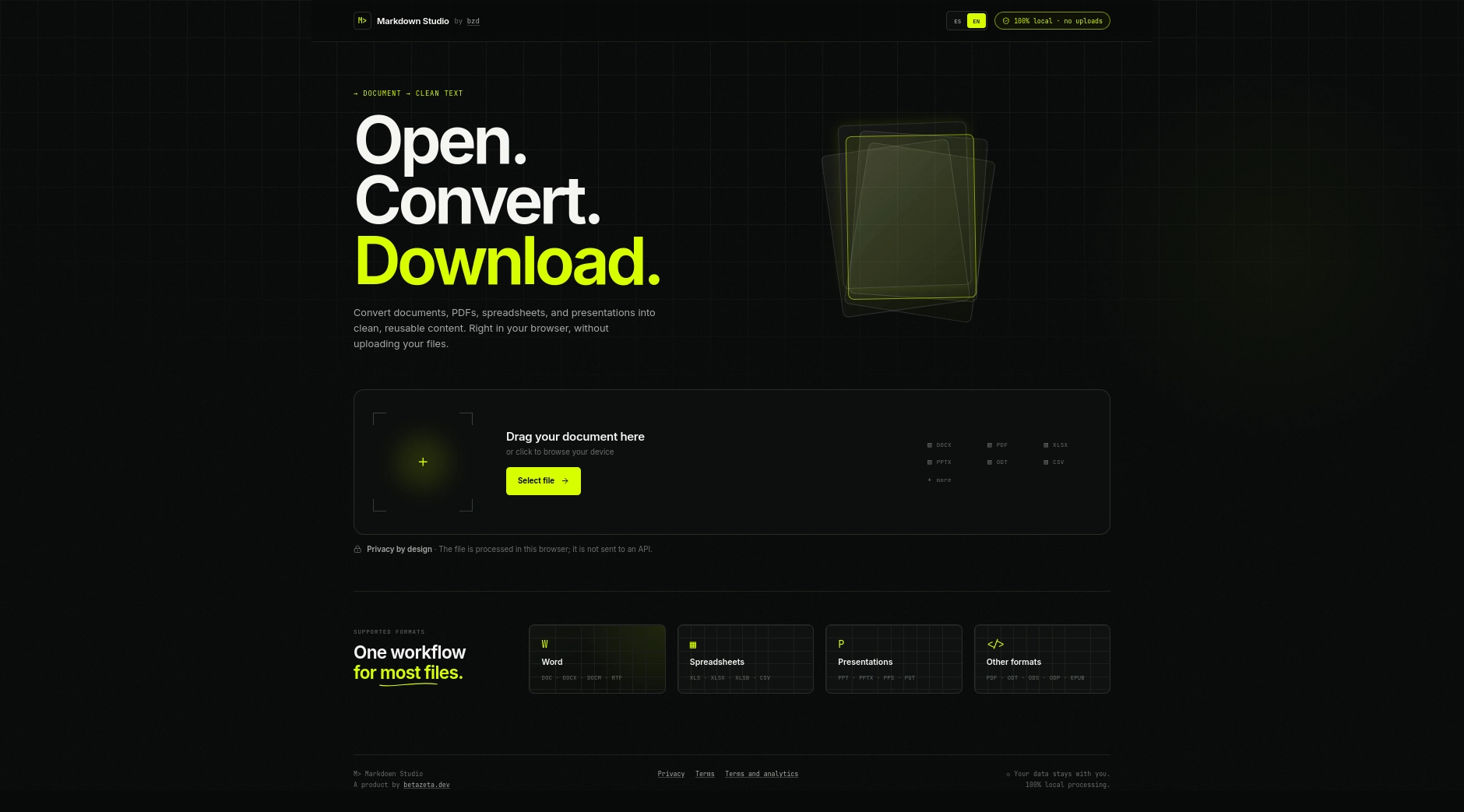
The information in a file should be usable without depending on the program that created it. Markdown Studio is a document to Markdown converter that turns files in different formats into simple, well-structured text, right in your browser. It isn’t trying to replace Word, Excel or PowerPoint; it does something far more specific: it gets the content out of the document and makes it ready to use wherever you actually need it.
Convert your documents to Markdown
Extract their content straight from your browser.
To see why this works, it helps to look at how office documents are put together. In a Word file or a presentation, the content and its visual appearance are tangled up: the headings, paragraphs and tables are there, but how they’re organised depends on the format and the program reading it. When you want to move that content somewhere else, you rarely need all of that visual layer; what you need is the text and a structure clear enough to keep working with.
That’s exactly what Markdown provides. It’s a plain-text format that uses a few symbols to mark the parts of a document: a hash at the start of a line makes it a heading, a dash starts a list item and vertical bars draw a table. It reads perfectly well as it is, any text editor can open it, and plenty of tools, from wikis and note-taking apps to documentation platforms, understand it and display it nicely formatted.
Markdown Studio uses that format as its destination. Instead of trying to mimic the look of the original, it turns its content into structured text you can read, edit and save as an .md file. The information is no longer tied to the document it arrived in.
Say someone sends you a Word file and you only want to move a few sections onto a web page. The usual routine is to open it in a word processor, copy, paste into another editor and spend a good while stripping out leftover styles and rebuilding the headings. With Markdown Studio you select the file or drag it onto the page, and within seconds you have its content converted, with headings, lists and tables already marked up.
You don’t need Office or any other suite to do it, and there’s nothing to install: the tool runs in the browser itself. That makes it a good fit when documents only land on your desk now and then, when you’re working on a computer that isn’t yours or when you simply don’t want to install a full application for a one-off job. It isn’t a document editor, though; it comes into its own when you no longer want to keep editing the original, but to make use of what’s inside it.
Documents don’t always arrive in the same format. Sometimes it’s a Word file, other times a spreadsheet, a presentation or a PDF, and keeping a different tool for each one makes little sense. Markdown Studio accepts Word documents, PowerPoint presentations, Excel spreadsheets, the equivalent OpenDocument formats used by LibreOffice and other suites, PDF files, EPUB books, CSV files and Rich Text documents.
Whether you drop in a .docx, a .pptx, an .xlsx or a .pdf, the tool recognises what kind of document it is and applies the right conversion. So you can pull the text out of a slide deck to write up documentation, turn the figures in a spreadsheet into a table you can paste anywhere, or extract the content of a report you want to add to a repository. CSV files, which are simply comma-separated data, come out directly as a Markdown table.
Naturally, the result depends on how each file is built: a document with properly defined headings will give a cleaner structure than one where the formatting was applied by hand.
There’s something many online converters don’t put front and centre: to convert your file, they first upload it to their servers. If that document contains personal details, work information or internal documentation, you’re handing its content to an outside service just to change its format.
Markdown Studio works differently. The conversion runs locally in your browser, without sending the document to any server to transform it. When you open the page, your browser downloads the conversion tool like any other part of the website; from then on, the file you choose is processed on your own device, and neither the document, nor its content, nor the resulting Markdown ever leaves it. Nor are they kept in the browser once you close the page.
It isn’t a setting you have to switch on or a promise that files will be deleted afterwards: the document simply never needs to travel anywhere to be converted.
A simple document with headings and paragraphs usually converts instantly; one with complex tables or an elaborate layout may need a little tidying up. That’s why you can check the result before using it. Markdown Studio shows it in two ways: a formatted preview, so you can see at a glance that headings, lists and tables are where they should be, and the raw Markdown, so you know exactly what text you’re taking away. For longer documents you can expand the preview to full screen, and a short summary tells you how many words and headings were recovered.
Once you’re happy, there are two ways to go. If you’re pasting the content into a note, a post or a document you’re already working on, copy it to the clipboard in one click. If you’d rather keep it as a separate file, download it as an .md file to save, add to a project or open in any Markdown-compatible editor.
With the content in Markdown, a whole range of options opens up that don’t involve reopening the original document, and you don’t need to be a developer to take advantage of them. Students can convert notes and materials shared in different formats and bring them together in their note-taking app. If you write articles or run a website, the result works as a draft without having to rebuild the structure by hand. If documentation is your job, you can move information that has sat in Word files for years into a wiki or a Markdown-based system.
And if you build software, it’s a quick way to carry specifications, tables or notes from a document into a README, a repository’s technical docs or any tool that works with structured text. Conversion won’t always remove every bit of follow-up work, but it lets you start with the content rather than with compatibility problems between formats.
Converting a document to Markdown doesn’t mean reproducing it. Markdown is a text format and has no way of representing many of the visual elements in office documents: a presentation may have elaborate layouts, a PDF may rely on precise page design and a spreadsheet may contain formulas or charts with no text equivalent. Markdown Studio recovers the usable content and its structure, not the design or the features of each format.
It’s also worth knowing the difference between a PDF that contains text and one made up only of scanned images. In the second case, getting the text out requires optical character recognition (OCR), which Markdown Studio doesn’t include, so a scanned PDF won’t give you the content you’re expecting.
Sometimes a simple task gets complicated just because the information is stored in a format that doesn’t suit what you need to do. Markdown Studio reduces that dependency: you open a document, convert it to Markdown, check the result and take it wherever you need it, without the file ever leaving your device. Because the information in a document should stay useful outside the program that created it.
Open Markdown Studio and start converting
Nothing to install, and your files are processed locally.
Concept to value
Discover A Coruña, find things to do and get around the city with a single app. Explore places and routes, check events, bus times, BiciCoruña, taxis and the weather forecast — an experience designed for visitors and locals alike.

Edit, enhance and transform images with AI. Remove backgrounds, upscale photos, expand scenes, change elements and explore new visual styles on a simple platform — no advanced editing skills required.

Share files between phones, computers and tablets quickly, easily and privately. No apps to install, no cables and no account required. Connect your devices and transfer files directly from your browser with end-to-end encryption.

Invent surprising stories with Spark, an illustrated story dice game where every roll sparks new ideas. Combine six random elements, improvise adventures and enjoy creating stories with friends or family.