Say you run a small online store. Its database holds hundreds or thousands of orders, customers and products. All that information is genuinely valuable, yet until now, looking anything up meant opening a SQL client, knowing the table schema and writing queries by hand. Every new question — how much did we bill last month? which product sells best? which customers have we lost? — becomes a small technical chore someone has to take care of. And if that someone isn’t you, the question sits in a pending message until the right person has a spare moment… or until the application ships that report natively.
The situation is so common we’ve almost normalized it: the data is right there, it’s ours, our own application generates it… but getting to it carries a technical toll that most of the people who need it simply can’t pay.
Thanks to the Model Context Protocol , that barrier disappears. We can plug an AI assistant straight into the database and start asking questions in natural language. No SQL client, no memorizing the schema, no writing a single query by hand. The assistant understands the question, works out which query is needed, runs it and hands you back the answer in plain English.
In this article we’ll build that scenario end to end with a complete, downloadable working example, so you can reproduce it exactly on your own machine and with your own data.
What MCP is and why it matters
Before rolling up our sleeves, it’s worth understanding exactly what the piece that makes all of this possible actually is.
The Model Context Protocol (MCP) is an open protocol developed by Anthropic and released in November 2024 that standardizes how language models talk to external tools and data sources. If you follow this blog you’ve met it before: we used it to connect LM Studio with n8n and automate technical tasks locally , where we compared it to the USB of LLMs. For today’s use case I prefer a different image: MCP turns the model into a restaurant customer. You order in your own language, without stepping into the kitchen or knowing how it works; the waiter — the MCP server — translates your request, the kitchen — the database — prepares it, and the dish arrives at your table. And the menu defines exactly what can be ordered: nothing that isn’t on it will ever leave the kitchen. Instead of every AI application inventing its own way of connecting to every tool, MCP defines that common contract anyone can implement.
The protocol distinguishes two roles. The MCP client is the application where the model lives and where you hold the conversation: it can be a desktop app, a code editor, a terminal agent or any piece of software that implements the protocol. The MCP server, in turn, is a program that exposes specific capabilities — tools, resources, data — following the standard. There are MCP servers for file systems, browsers, APIs and, what interests us today, for databases.
When a client connects to an MCP server, the model sees a catalog of well-defined tools — the restaurant menu — each with a name, a natural-language description and typed parameters. The model can choose to invoke them whenever it needs to in order to answer your question, and whatever sits behind each tool is completely opaque to it.
So why does this matter? Because it decouples the model from the integrations. An MCP server for SQLite written once works with any compatible client, today and tomorrow. And an MCP client can connect to any server without anyone having to code that specific integration. It’s the difference between an ecosystem of interchangeable parts and a tangle of proprietary connectors. And that ecosystem keeps growing: the W3C is already working on WebMCP, a proposal to let websites themselves expose tools to AI agents .
What we’re going to build
To see it in action we’ll work with BetaShop, a small fictional online store selling tech products, backed by a very simple SQLite database. The goal is to show how any user — technical or not — can query all of the store’s information using nothing but natural language.
By the end of the article you’ll be able to ask it things like:
- Which category generates the most revenue?
- Which products have never sold?
- Which customers haven’t bought anything in over six months?
- Summarize last quarter’s sales.
- Which categories are growing fastest?
All of it without writing a single line of SQL.
One important note: the database isn’t real. It’s a downloadable SQLite file included with the article, with data generated specifically for this tutorial. You can grab it and follow every step with exactly the same data you’ll see in the screenshots, with no external services involved and no sensitive information exposed.
Architecture
The system’s architecture is deliberately simple, and that simplicity is part of the message:
  Claude Desktop
    ↓
  SQLite MCP server
    ↓
  BetaShop.sqlite
You type a question into the client. The model interprets it and, whenever it needs data, invokes the tools exposed by the SQLite MCP server. The server runs the query against the SQLite file and returns the result, which the model turns into a natural-language answer. Claude Desktop never touches the database directly: every query goes through the MCP server first.
All communication happens locally over STDIO: no Docker, no HTTP server to spin up, no ports to expose.
One key detail: the client is interchangeable. In this article we use Claude Desktop, but it could just as well be a code editor or an agent in your terminal. It makes no difference: the architecture stays exactly the same, because MCP defines a standard contract between the parts. The server neither knows nor cares which client is on the other side. That’s why the star of this article isn’t any particular product: it’s the protocol.
What you’ll need
The shopping list is short: Claude Desktop as the MCP client, Node.js (which bundles npm and npx) to run the server, and optionally a SQLite GUI tool, only if you want to poke around the database yourself — it comes preinstalled on macOS and most Linux distributions, and DB Browser for SQLite is a solid pick if you don’t have one.
We won’t spend much time on the client: its only job here is to act as the interface for firing off queries. The whole explanation revolves around MCP.
The BetaShop database
BetaShop uses a relational model that’s simple but complete enough to show what MCP can do. It’s the schema you’d find in any small online store, boiled down to the essentials: six tables covering the full lifecycle of a sale.
The customers table holds the registered customers, with their name, email, phone number and sign-up date, while addresses stores the addresses linked to each of them. The catalog lives in products — each product with its SKU, price, stock and category — organized through categories. Finally, orders records the orders with their date, status, payment method and total, and order_items contains each order’s line items: product, quantity and unit price at the time of purchase.
The relationships follow the natural chain of any store: a customer places orders, each order contains line items, each line item points to a product, and each product belongs to a category.
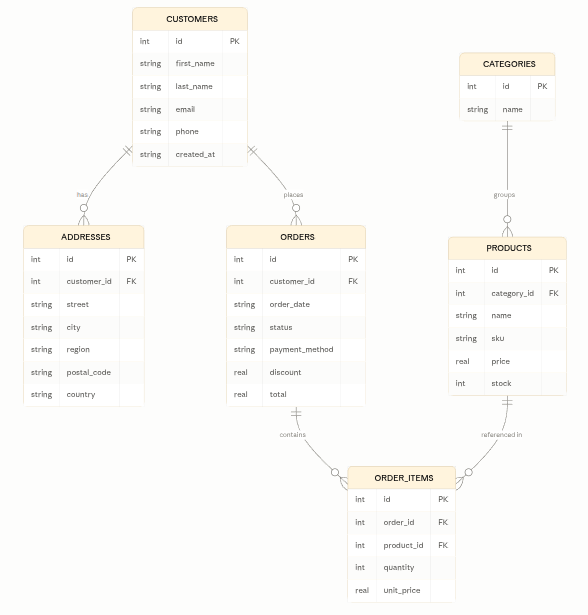
As for data volume, the database contains 100 customers, 100 addresses, 48 products spread across 8 categories, 500 orders and 1,481 order line items. The size is a deliberate choice: small enough for queries to be fast and easy to follow, yet varied enough to yield genuinely interesting results. You’ll find very active customers alongside others who haven’t bought in ages, best-sellers next to products that barely move, and busier and quieter periods that make for much richer analysis.
And that’s all you need to know about the schema. We’re deliberately not going any deeper, because that’s precisely one of the beauties of this approach: you won’t need to know the schema to query it. The model will discover it on its own when you ask.
Setting up the MCP server in Claude Desktop
Download the BetaShop.sqlite database from the article’s resources and save it to a folder on your disk. Then, in Claude Desktop, go to Settings → Developer → Edit Config. That button opens the folder where Claude Desktop keeps its configuration file, claude_desktop_config.json. You don’t need to touch any other developer-mode option.
Sample database with 100 customers, 100 addresses, 48 products across 8 categories, 500 orders and 1,481 order line items, all fictional. Save it to a folder on your disk and point the MCP server configuration at it to follow the tutorial with the same data.
DownloadAdd the following MCP server to the file:
  {
    "mcpServers": {
      "sqlite": {
        "command": "npx",
        "args": [
          "-y",
          "mcp-sqlite",
          "/home/USER/Development/Lab/BetaShop/BetaShop.sqlite"
        ]
      }
    }
  }
The only thing you need to change is the path to your own copy of the database. The example shows a Linux path; on macOS it will look like /Users/youruser/Development/Lab/BetaShop/BetaShop.sqlite, and on Windows something like C:\\Users\\youruser\\Development\\Lab\\BetaShop\\BetaShop.sqlite — note the double backslashes, required because \ is the escape character in JSON.
Why npx? Because it saves us the installation: there’s no need to install the server globally. Claude Desktop will run it automatically through npx whenever it needs it, always using the published version of the mcp-sqlite
package.
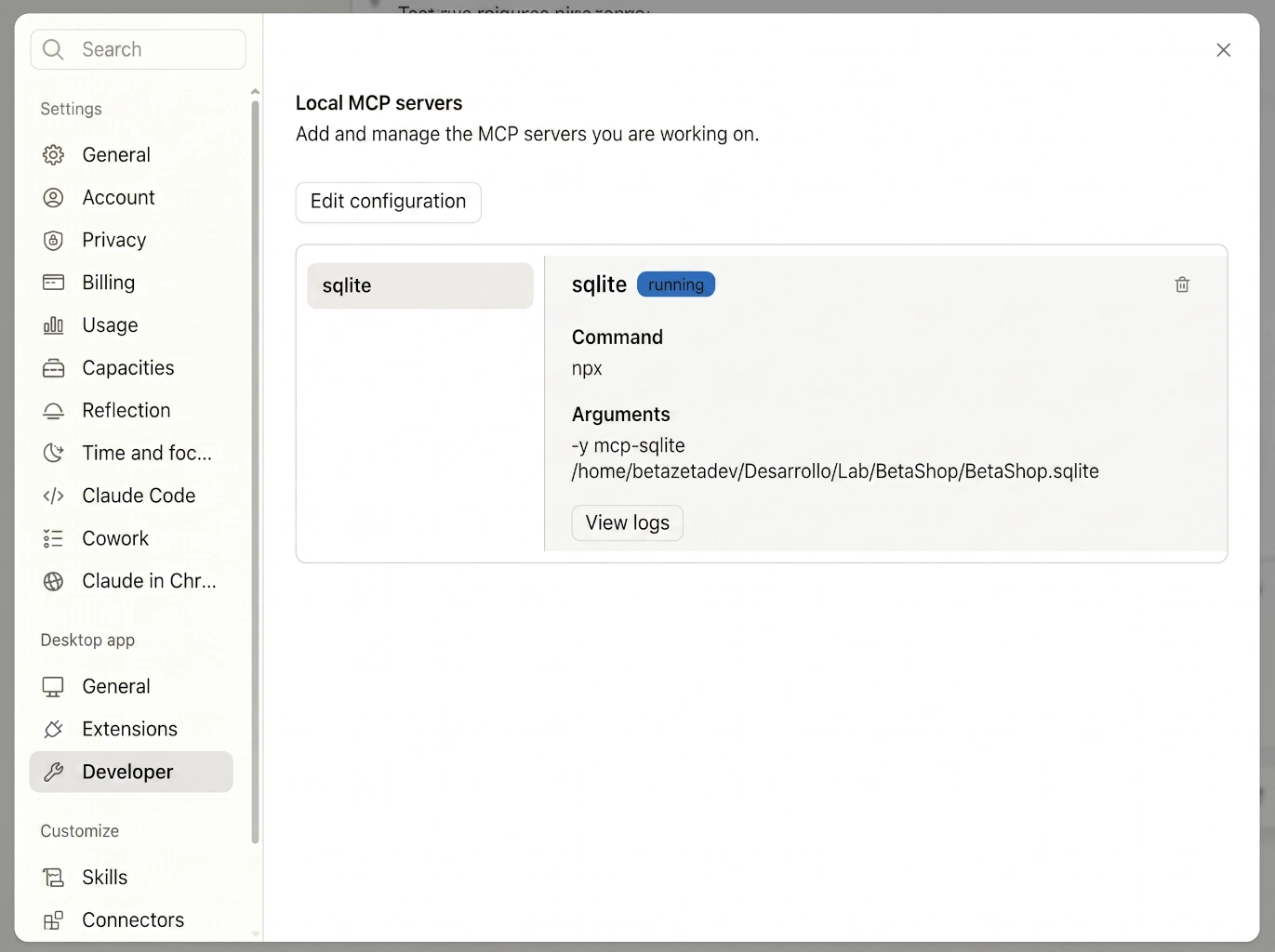
Save the file, add the MCP server to Claude Desktop’s configuration, quit the app completely and open it again. After restarting, under Settings → Developer → MCP Servers you’ll see a new server called sqlite with a Running status. If it shows up as Failed or Disconnected, something in the configuration is off: check the logs from that same screen via View Logs. The most common culprits are a wrong path, a missing database file (you’ll see a SQLITE_CANTOPEN) or the system not finding npx.
First check
With the server running, open a new chat in Claude Desktop and try a simple query:
These are the tables in the connected SQLite database:
- customers
- addresses
- categories
- products
- orders
- order_items
It looks like a typical e-commerce database (customers, addresses, categories, products and orders). Would you like me to look at the structure (schema) of any table in particular?
If the answer correctly lists BetaShop’s six tables, the MCP connection is up and running. From this point on, every question you ask will automatically translate into calls to the SQLite server through the Model Context Protocol. And that’s it: there’s no more setup. Everything from here on is conversation.
The “most basic” queries
This is the most important part of the article: watching the system work through real conversations against the BetaShop database. We’ll start with simple questions and progressively raise the bar until we reach requests that, until very recently, would have called for a data analyst with a free morning. In the examples that follow, each conversation appears in a highlighted block: at the top, on a dark background, the question exactly as I typed it to the assistant; below it, the answer it returned, unedited. Everything outside those blocks is my own commentary.
A simple count
Let’s start with the simplest thing there is, the kind of question you’d solve with a COUNT(*):
The store has 100 registered customers.
Notice what just happened: the model didn’t know the database schema. Before answering, it inspected the available tables, understood their structure and built the right query. That discovery work — which would take a human a little while even with the schema in front of them — happens transparently in seconds.
Sales analysis
Let’s step it up. These questions already require joining several tables — orders, line items, products, categories — and aggregating results:
These are the five best-selling products by total units:
| # | Product | SKU | Units sold |
|---|---|---|---|
| 1 | Headset Quest 6 | BS-05-006 | 104 |
| 2 | Headset Year 5 | BS-05-005 | 95 |
| 3 | Network Capital 5 | BS-07-005 | 84 |
| 4 | Headset Turner 1 | BS-05-001 | 82 |
| 5 | Storage Enterprise 1 | BS-06-001 | 76 |
Interestingly, 3 out of the 5 belong to the same category (headphones). Would you like me to check which categories sell the most overall, or the revenue generated by each product?
Ranking of categories by revenue generated (quantity × unit price in order_items):
| # | Category | Revenue |
|---|---|---|
| 1 | Headphones | $418,195.72 |
| 2 | Networking | $406,780.20 |
| 3 | Smart Home | $353,113.05 |
| 4 | Keyboards | $316,040.95 |
| 5 | Laptops | $266,056.13 |
| 6 | Storage | $232,175.26 |
| 7 | Mice | $222,743.41 |
| 8 | Monitors | $157,404.47 |
Headphones leads the ranking, consistent with 3 of the 5 best-selling products belonging to that category. It’s interesting that Networking comes second despite not appearing among the top products by units — it likely has higher unit prices. Want me to confirm that by comparing the average price per category?
Here’s the sales summary for Q1 2026 (January–March):
Overall figures
- Total orders: 61
- Total revenue: $273,759.33
- Average order value: $4,487.86
- Discounts applied: $285.00
Orders by status
| Status | Orders |
|---|---|
| Completed | 42 |
| Shipped | 9 |
| Processing | 5 |
| Cancelled | 5 |
Top 5 categories by revenue
| Category | Revenue | Units |
|---|---|---|
| Headphones | $54,177.49 | 61 |
| Networking | $47,359.91 | 44 |
| Laptops | $39,890.19 | 47 |
| Smart Home | $35,649.80 | 43 |
| Keyboards | $35,482.10 | 38 |
That last one deserves a comment. “Summarize sales for the first quarter” is not a query: it’s an open-ended request the model has to interpret, break down into several queries — total revenue, monthly evolution, standout products — and synthesize into a coherent piece of text. It’s exactly the kind of task where this approach shines compared to traditional SQL.
Questions that start to get interesting
This is where the system starts earning its keep. These are the questions that, in a real company, end up in the “pending reports” backlog:
These are the products that have gone the longest without recording a sale (using today, July 14, 2026, as the reference):
| Product | SKU | Last sale | Days without selling |
|---|---|---|---|
| Headset Forces 3 | BS-05-003 | 2026-04-02 | 103 |
| Laptop Today 1 | BS-01-001 | 2026-04-28 | 77 |
| Laptop Even 2 | BS-01-002 | 2026-05-10 | 65 |
| Network Capital 5 | BS-07-005 | 2026-05-10 | 65 |
| Mouse Presence 3 | BS-04-003 | 2026-06-04 | 40 |
| Storage Earth 3 | BS-06-003 | 2026-06-04 | 40 |
| Mouse Maybe 5 | BS-04-005 | 2026-06-09 | 35 |
| Network First 6 | BS-07-006 | 2026-06-09 | 35 |
| Monitor Election 4 | BS-02-004 | 2026-06-11 | 33 |
| Headset Members 4 | BS-05-004 | 2026-06-14 | 30 |
Headset Forces 3 clearly stands out: it hasn’t sold in 103 days, nearly twice as long as the runner-up (Laptop Today 1, 77 days). It might be worth checking whether it has a pricing, visibility or stock problem.
There are 32 customers who haven’t made a purchase in over six months (since before 2026-01-14), out of 100 total customers:
| Customer | Last purchase | Days without buying | |
|---|---|---|---|
| Ashley Campbell | ashleycampbell@example.net | 2024-11-19 | 602 |
| Bobby Richardson | bobbyrichardson@example.org | 2024-12-14 | 577 |
| Bradley Butler | bradleybutler60@example.org | 2025-01-17 | 543 |
| Billy Foster | billyfoster64@example.org | 2025-04-29 | 441 |
| James Kennedy | jameskennedy@example.com | 2025-06-16 | 393 |
| Andrew Morris | andrewmorris@example.net | 2025-07-02 | 377 |
| Janet Hall | janethall@example.com | 2025-07-16 | 363 |
| Douglas Diaz | douglasdiaz51@example.net | 2025-07-16 | 363 |
| Brandon Green | brandongreen@example.org | 2025-07-19 | 360 |
| Bryan Jackson | bryanjackson@example.net | 2025-08-03 | 345 |
| Angela Hernandez | angelahernandez98@example.com | 2025-08-24 | 324 |
| Diana Coleman | dianacoleman97@example.net | 2025-09-07 | 310 |
| Albert Jones | albertjones63@example.net | 2025-09-16 | 301 |
| Carl Gomez | carlgomez@example.com | 2025-09-16 | 301 |
| Anna Patel | annapatel@example.net | 2025-09-28 | 289 |
| Daniel Davis | danieldavis@example.com | 2025-10-14 | 273 |
| Abigail Mitchell | abigailmitchell@example.org | 2025-10-19 | 268 |
| Doris Perez | dorisperez@example.net | 2025-10-21 | 266 |
| Barbara Miller | barbaramiller@example.net | 2025-10-24 | 263 |
| Charlotte Lopez | charlottelopez50@example.net | 2025-11-10 | 246 |
| Christine Collins | christinecollins@example.com | 2025-11-21 | 235 |
| Christian Reyes | christianreyes@example.org | 2025-11-29 | 227 |
| Dorothy Edwards | dorothyedwards@example.org | 2025-11-29 | 227 |
| Doris Ortiz | dorisortiz@example.net | 2025-12-06 | 220 |
| Harold Brown | haroldbrown@example.org | 2025-12-16 | 210 |
| Adam Reed | adamreed@example.org | 2025-12-16 | 210 |
| Brian Peterson | brianpeterson@example.com | 2025-12-19 | 207 |
| Alice Gutierrez | alicegutierrez@example.com | 2025-12-25 | 201 |
| Betty Diaz | bettydiaz@example.net | 2025-12-26 | 200 |
| Gary Bennett | garybennett@example.org | 2026-01-03 | 192 |
| Gerald Carter | geraldcarter@example.org | 2026-01-05 | 190 |
| Danielle Robinson | daniellerobinson81@example.com | 2026-01-13 | 182 |
One additional note: there is 1 more customer who has never made a purchase at all (not shown in this list because there’s no order history to compare against).
Ashley Campbell stands out as the most critical case, at over 600 days (~20 months) without buying. This group of 32-33 customers could be a good target for a win-back campaign.
These kinds of questions — the ones that detect what is not happening: products that don’t move, customers who quietly walked away — are precisely the ones almost nobody ever gets around to asking, because writing the SQL to answer them takes more motivation than is usually available on a Tuesday afternoon.
Analyst level
And we close with the two most demanding requests. The first calls for a period-over-period comparison; the second, a global synthesis of everything we’ve seen so far:
Comparing the same period (January 1 – July 14) of 2025 vs. 2026, to keep the comparison fair:
| Category | Revenue 2025 (YTD) | Revenue 2026 (YTD) | Growth |
|---|---|---|---|
| Smart Home | $86,938.97 | $99,439.25 | +14.4% |
| Laptops | $61,004.20 | $72,723.49 | +19.2% |
| Keyboards | $69,702.42 | $71,987.46 | +3.3% |
| Storage | $58,238.04 | $60,708.39 | +4.2% |
| Networking | $114,847.46 | $105,254.72 | -8.4% |
| Headphones | $118,117.27 | $101,564.71 | -14.0% |
| Mice | $68,009.39 | $47,020.85 | -30.9% |
| Monitors | $55,110.54 | $43,570.39 | -20.9% |
The fastest-growing categories are:
- Laptops: +19.2%
- Smart Home: +14.4%
- Storage: +4.2%
Strikingly, Headphones and Networking — the leading categories by all-time revenue — are actually declining this year, while Mice and Monitors show the sharpest drops (-30.9% and -20.9%). This suggests a shift in demand: the catalog is rotating toward laptops and smart home, away from traditional peripherals.
A full store health check
To wrap up, a single request that forces the model to synthesize everything above into one report:
Based on the analysis of the full database, here’s the executive summary:
Executive summary
(data as of July 15, 2026)
Overall figures
| Metric | Value |
|---|---|
| Registered customers | 100 |
| Products in catalog | 48 |
| Total orders | 500 |
| Total revenue | $2,248,992.47 |
| Average order value | $4,497.98 |
Order health
| Status | Orders | Revenue | % of total |
|---|---|---|---|
| Completed | 356 | $1,614,874.86 | 71.2% |
| Shipped | 65 | $292,158.02 | 13.0% |
| Processing | 49 | $205,150.36 | 9.8% |
| Cancelled | 30 | $136,809.23 | 6.0% |
The cancellation rate (6%) is low and healthy.
Category performance
- All-time leaders: Headphones and Networking account for the largest cumulative revenue.
- Growth trend: Laptops (+19.2%) and Smart Home (+14.4%) are this year’s rising categories.
- In decline: Mice (-30.9%) and Monitors (-20.9%) show the sharpest drops, and the leaders Headphones (-14%) and Networking (-8.4%) are also losing ground.
Points of attention
- Healthy catalog: all 48 products have recorded sales; there are no “dead” items.
- Slow-moving product: Headset Forces 3 hasn’t sold in 103 days.
- Low stock: 4 products with fewer than 10 units in inventory — risk of stockout.
- Inactive customers: 32 customers (32% of the base) haven’t bought in over 6 months, plus 1 customer who has never made a purchase — a clear opportunity for a win-back campaign.
Conclusion
The store is in a solid financial position, with a high order completion rate and low cancellations. However, there’s a demand rotation toward laptops and smart home that deserves strategic attention, and a sizable base of inactive customers representing untapped revenue.
Look back at the variety of what we just did: simple counts, multi-table aggregations, rankings, time filters, period-over-period comparisons and executive syntheses. Not one of these questions required knowing the schema, writing SQL or leaving the chat window.
What happens under the hood?
It may look like magic, but it isn’t, and understanding what goes on between typing the question and receiving the answer matters — both to trust the system and to know its limits.
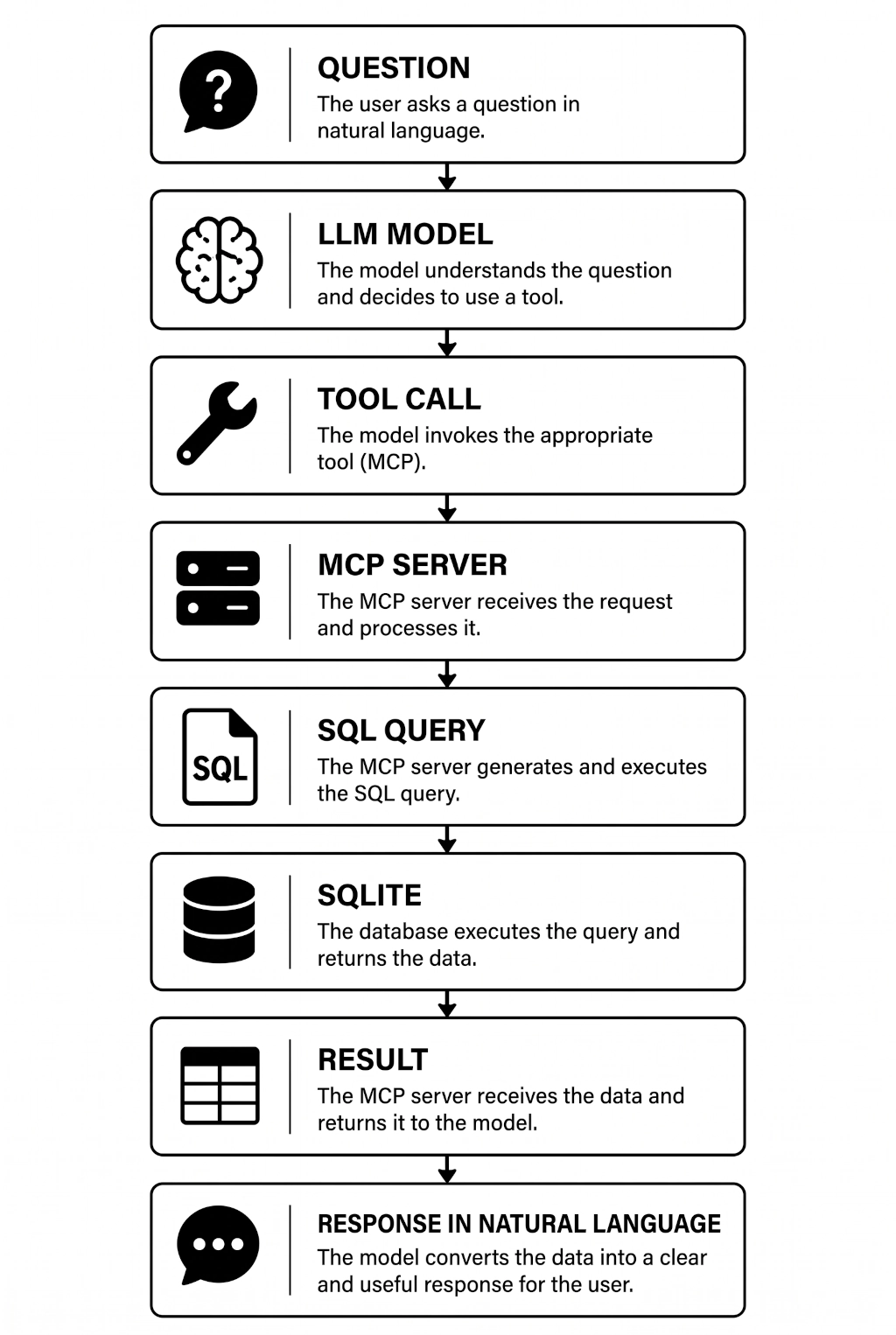
When you type a question, the model interprets it and decides whether it needs data to answer. If it does, it consults the catalog of tools the MCP server has advertised and generates a tool call: a structured invocation of the right tool, with the SQL query as a parameter. Here’s the important nuance: the model writes the SQL, but doesn’t execute it. It’s the MCP server that receives the call and runs it against the SQLite file. The result flows back to the model, which interprets it and writes the answer in natural language. If it needs more data, it repeats the cycle with new queries before answering; on complex requests, like the executive summary, that loop can run half a dozen times without you ever noticing.
The key point of the whole design is that the model never touches the database directly. The server acts as both intermediary and boundary between the model and your data: the model can only do what the server exposes as a tool. That separation is what lets you control access — by choosing the server, its permissions and which file it operates on — without relying on the model behaving itself.
And precisely because of that, one important recommendation before pointing this at data you care about: always work on a backup copy or a replica, never on the production database or one that’s in active use. Language models can hallucinate, misread a question or generate a query that isn’t quite what you expected, and the simplest way to keep that risk away from your data is to make the file the server operates on disposable. With a copy, any potential slip by the model becomes a zero-consequence problem: delete the file, copy it again and move on.
The upsides
Once you’ve seen it working, the advantages mostly speak for themselves, but they’re worth naming.
The most obvious one: you don’t need to know SQL, and you don’t need to know the table schema either. Questions are phrased in your language, not the database’s, and the model takes care of exploring the structure for you. You can ask about “customers who haven’t bought in months” without knowing that it means joining customers with orders and filtering by date. Syntax stops being a barrier to entry.
The second is how it changes the way you explore data. Querying stops being a cycle of “think up the query, write it, run it, tweak it” and becomes something conversational and iterative: each answer suggests the next question, and the cost of each iteration is simply typing it. That dramatically cuts the time it takes to get an answer — what used to mean opening the SQL client, recalling the schema and drafting the query is now ten seconds — and shortens the distance between a business question and the decision that depends on it.
But the deepest change is something else: it makes databases accessible to non-technical users. The person who needs the data no longer depends on the person who knows how to extract it. That bottleneck, which exists in practically every organization, simply vanishes for ninety percent of everyday queries.
The limits
And as always around here, let’s be honest about the limits, because there are some.
The quality of the answers depends directly on the model you use: a more capable one writes more correct queries, handles ambiguous questions better and synthesizes results better, while with modest models — such as the smaller local models — you’ll run into misinterpretations and queries that don’t quite answer what you asked. Don’t expect optimal queries either: the model knows nothing about indexes or execution plans, which is irrelevant on a small database like BetaShop but can become a problem over millions of rows.
On the security front, the rule is simple: always restrict access with proper permissions. Never connect an assistant with write access to data that matters; work on a copy or a read-only replica, especially at first. The MCP server is your security boundary and should be configured as such.
Finally, this doesn’t replace knowing SQL when advanced analysis is required. For audits, optimization or queries where you need exact guarantees about what was executed, you’ll still want to write the SQL yourself, or at least review it.
None of this invalidates the approach; it simply marks out its playing field. For exploration, lookups and everyday analysis, the balance is clearly in its favor.
Real-world use cases
And here we get to the part that really matters. BetaShop is a teaching toy, but exactly the same architecture — same server, same configuration, same flow — works with any application that stores its data in SQLite. And there are far more of those than it seems, because SQLite is probably the most widely deployed database in the world .
Think of management software: an ERP or invoicing system you can ask about unpaid invoices or delinquent customers; a CRM you can ask for contacts with months of inactivity; an inventory that tells you which items are running low; a booking system you can pull occupancy and seasonality from; a ticketing system that summarizes resolution times by category. This isn’t theory: around here we already run an AI assistant plugged into a real workflow, from when we automated email-based technical support .
Think of your personal setup too: Home Assistant stores your home’s sensor history, energy consumption and automations in SQLite, ready to be queried in natural language. And above all, think of the software already around you: SQLite is the standard database on Android and iOS, and the internal storage of countless Electron and desktop applications, document managers, e-learning platforms and knowledge bases. Practically any tabular data can be turned into a conversation.
The idea I want you to walk away with is this: think of any application you use — or have built — that stores data in SQLite. Point the MCP server at that file, and you’ve just turned it into a conversational source of information. Without touching a single line of the original application’s code.
What about PostgreSQL, MySQL…?
One important clarification before closing: we used SQLite purely because it makes learning easy. It’s a single file, there’s no database server to stand up, and it can be downloaded along with the article so the tutorial is one hundred percent reproducible.
But the pattern is identical for any other engine. There are MCP servers for PostgreSQL , MySQL, MariaDB, SQL Server and other compatible engines. The recipe doesn’t change: swap in the MCP server for the corresponding engine, adjust the connection string, and everything else — the client, the questions, the internal flow, the care with permissions — stays exactly the same. If your application migrates from SQLite to PostgreSQL tomorrow, your conversational layer migrates by changing a few lines of configuration.
That, once again, is the advantage of building on a standard protocol instead of a one-off integration.
Conclusion
If you take a single idea away from this article, let it be this: the real value of MCP is not connecting an AI to a database. That’s just the demo. The real value is turning any SQLite-based application into a conversational source of information. From that moment on, querying the data stops being a technical task reserved for whoever knows SQL and becomes as natural as asking a question.
The next step is yours. Download the BetaShop database, set up the server in five minutes and experiment with your own queries: it’s the best way to internalize what you’ve just read. Try odd questions, ambiguous questions, chained questions. Watch how the model explores the schema and reasons its way to the queries.
And once you’ve got the hang of it, run the real test: connect that very same MCP server to the database of a real application — your CRM, your ERP, your invoicing system, your inventory — and turn it into an assistant capable of answering complex questions in natural language. That’s the day you’ll understand why this protocol is changing the way we talk to our data.
Happy Building!!