For years we answered practically every support email by hand. Today, a large part of them get a response within seconds, thanks to an AI assistant. The interesting part wasn’t building the system. The hard part was learning to properly organise the knowledge that feeds it.
Since we launched our first apps, we’ve tried to stay close to our users. We’ve always believed that technical support isn’t an add-on — it’s a core part of the product itself.
When someone runs into a problem, has a question, or just needs a hand, we want them to be able to reach us and get a quick answer. That philosophy has led to a lot of things: feature improvements driven by user feedback, bugs fixed in record time, and a consistently high response rate across emails, Play Store reviews, and every other channel we’re on. I’d say more than 90% of our Google Play reviews have received a reply, and the same goes for emails and direct messages. It’s something we’re proud of and something we intend to keep up — it’s part of who we are.
The challenge, though, is obvious: as an app grows, so does the volume of support requests. Many of them are repetitive, straightforward to resolve, and eat up time we could spend making the product better.
That’s when we started asking ourselves: could we automate part of the support without sacrificing quality?
We didn’t have a clear answer. We suspected it was possible, but we had no idea how — and probably not in the way you’d expect.
What we wanted to achieve
Our goal was never to replace human support. We still personally read every conversation and still handle every case that calls for a more personal touch or a deeper investigation.
What we were after was cutting out the repetitive work. Specifically, we wanted the system to respond immediately to the most common questions, do so in the user’s own language, draw only from official and verified information, keep a tone consistent with the rest of the product, and allow for human oversight whenever necessary.
In other words, we wanted AI to act as a first layer of support — a filter — not as a replacement for the team. The human element matters, and its value is only going to increase in the years ahead.
The real key isn’t the AI — it’s the knowledge it receives
One of the most common misconceptions about AI assistants is that you just plug in a language model and useful answers come out. Our experience has been the exact opposite.
The assistant can only respond correctly because it has access to an extensive knowledge base about WorkIO , our time-tracking app. That base covers how the app works, its features, frequently asked questions, internal processes, privacy policies, how each section functions, and specific instructions on how the assistant should respond — where it should stop and what topics it should avoid or redirect.
In other words, it doesn’t rely solely on the model’s general knowledge. It works from documentation written specifically for this purpose. That base covers all three available platforms — Android, iPhone, and the web version — and allows responses in the same language the user has set in the app. The result is far fewer incorrect answers and much more consistent, on-brand replies.
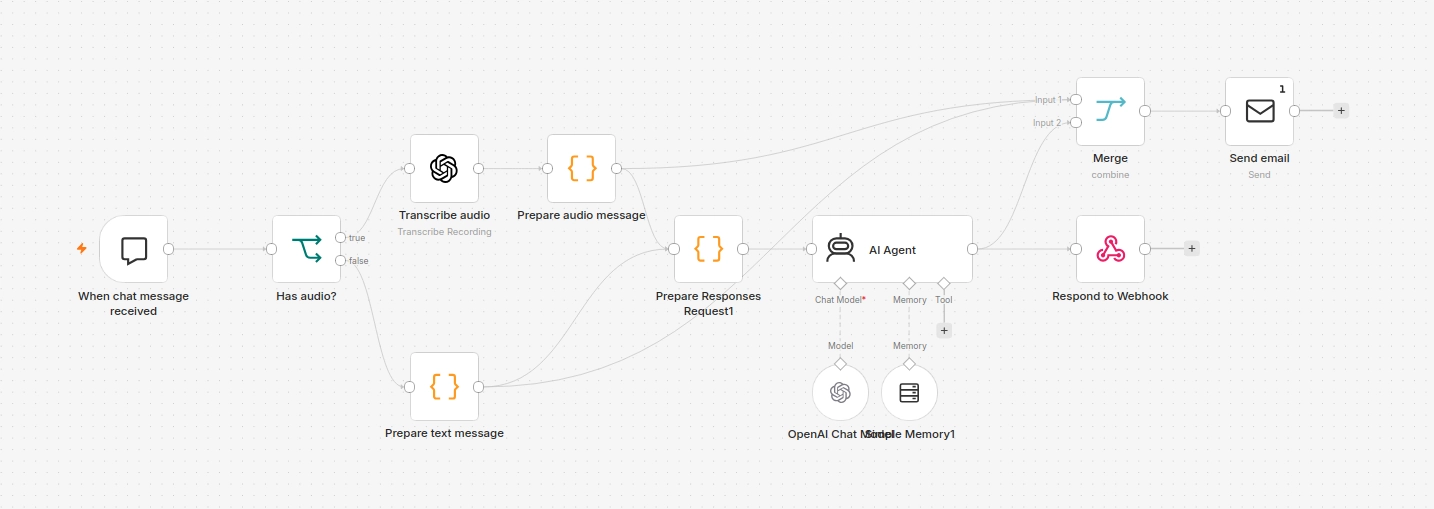
The app also makes it clear to users that they’re talking to an AI assistant. There’s no deception: anyone accessing support from that point knows the answer is coming from an automated system. And yet the quality of those responses is high enough that the experience feels positive. What makes the system work isn’t magic — it’s work. A lot of documentation work and ongoing follow-up.
AI also needs training
One of the trickiest issues showed up early on.
When a user asked “What can WorkIO do?”, the assistant would respond with a long list of features. Technically correct — but a poor answer.
Nobody wants to read a feature list. What users want to know is how the app can help them day to day. WorkIO isn’t just a time-logging app. It’s a tool designed to help people make better-informed decisions about the time they spend working, so they can actually enjoy their free time. There’s a big difference between describing technical functions and explaining real purpose.
The fix wasn’t switching to a different AI model. The fix was updating the documentation it uses as context. From that point on, the assistant stopped listing features and started explaining what problems WorkIO actually solves and how it can improve someone’s life.
That small change made a noticeable difference in response quality, and it was a lesson that kept coming back: most of the time, the problem isn’t the AI. It’s the information the AI has access to.
How we automated email support
Once the assistant was responding reliably inside the app’s chat, we decided to reuse the exact same knowledge base for another channel: email.
Not every incoming message gets an automatic reply — only those sent directly from within the app. To identify them, we use a specific subject line that WorkIO generates automatically when the user taps the email contact button. That subject is translated into each supported language, which also lets us detect the user’s language without any manual analysis and guarantees the reply always arrives in the same language the user wrote in.
When an email with that subject arrives, an automated flow kicks in: it identifies the user’s language from the subject line, sends the query to the assistant, generates a reply using the internal documentation, applies an HTML template with the WorkIO and BetaZetaDev branding, and delivers the response to the user within seconds — all without any immediate human involvement.
That word, “immediate”, matters. We still review every single conversation to catch incorrect responses and keep improving the assistant’s documentation — and above all, the user experience. Automation doesn’t eliminate oversight. It makes oversight far more efficient.
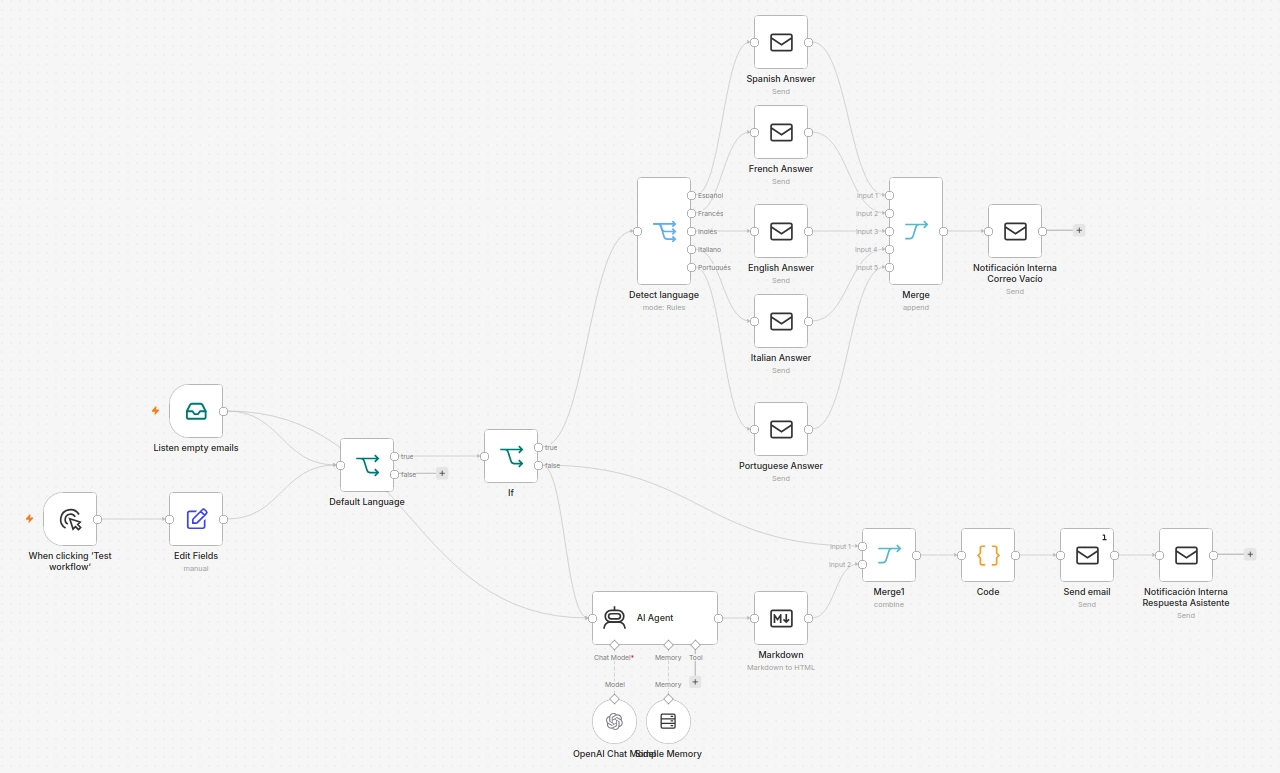
One detail worth pointing out about the flow shown in the image: the workflow actually has two branches. If an email arrives with the recognised subject but an empty body, the system sends a predefined response immediately, without involving the AI at any point. The AI only steps in when the email contains actual text — something that requires a thoughtful reply. That small distinction makes the system more robust and avoids unnecessary calls to the assistant for cases that don’t need it.
What we’ve achieved
Since we put this system in place, the time spent handling repetitive queries has dropped by around 80%.
That doesn’t mean we’ve stopped looking after users — quite the opposite. Simple questions now get an almost instant reply, while we can dedicate much more time to the issues that genuinely require personal attention, investigation, or development work. Instead of spending time copying similar answers over and over, we can put that time into improving the product, which ultimately benefits users as well.
It’s not perfect, of course. This is a technology that’s still evolving, and some responses fall short of what you’d expect from someone who knows the product inside and out. But others genuinely surprise us with their accuracy and clarity. And when something goes wrong, we’re there to step in, correct it, and update the documentation so it doesn’t happen again.
There was one specific situation that made us realise the system was delivering more value than we’d anticipated. A user had gone through several exchanges with the assistant trying to resolve a particular issue. The assistant had guided them through the conversation — asked for more details, suggested different approaches, ruled out likely causes. Eventually it hit a wall: the issue needed someone to look at it personally. The assistant made that clear and recommended the user get in touch via email.
So far, nothing out of the ordinary. What caught us off guard was what came next: the user asked the assistant to draft that email for them. And it did. It put together a full message covering all the details from their conversation — structured, clear, and ready to send.
The user sent it as-is. We received it with all the context we needed right from the first read, and were able to resolve the issue without needing to ask a single follow-up question. Fast, clean, and friction-free for everyone.
That’s exactly the kind of interaction that makes the system worth having: not a bot that answers and closes the ticket, but a first layer of support that walks users as far as it can — and when it reaches its limit, helps them take the next step as smoothly as possible.
A simple example you can set up in under ten minutes
Everything we’ve described about WorkIO
might seem complex to replicate, but the underlying logic is far more accessible than it looks. To show that, we’ve put together an n8n workflow that implements exactly the same idea: listen for incoming emails, detect whether the subject matches a specific pattern, analyse them with AI, and send a PUSH notification to any of your devices via ntfy with a useful summary of the message.
The workflow has six nodes chained together. The first one listens to the inbox via IMAP. The second filters emails by subject, so only those containing the text you’ve set as your identifier pass through to the next step. From there, a code node extracts the sender and body, strips any HTML tags, and builds the prompt that will be sent to the AI. The fourth node calls the OpenAI API with that prompt and a very specific system instruction: always return a valid JSON object with the email’s category, priority, a summary of no more than 180 characters, and the recommended next action. The fifth node parses that response, assigns icons based on category and priority, and builds the notification title and body. The last node sends everything to ntfy.
The result is immediate and reaches any device: at a glance you can see whether it’s a bug, a general query, something urgent — along with a summary of the message and what to do next — all without opening your email client. ntfy isn’t mobile-only; you can receive notifications on your computer, phone, or any browser simply by visiting your channel URL, for example https://ntfy.sh/your-channel-here. Any device with that URL open, or with the ntfy app installed and subscribed to the channel, will receive the alert in real time.
To adapt it to your own setup, you only need to change three things: your IMAP credentials, the subject text you use as your identifier, and your ntfy channel name in the last node’s URL. You’ll also need to connect the OpenAI node with your own credentials. The model is set to gpt-4o-mini, which is more than capable for this task and costs almost nothing per call.
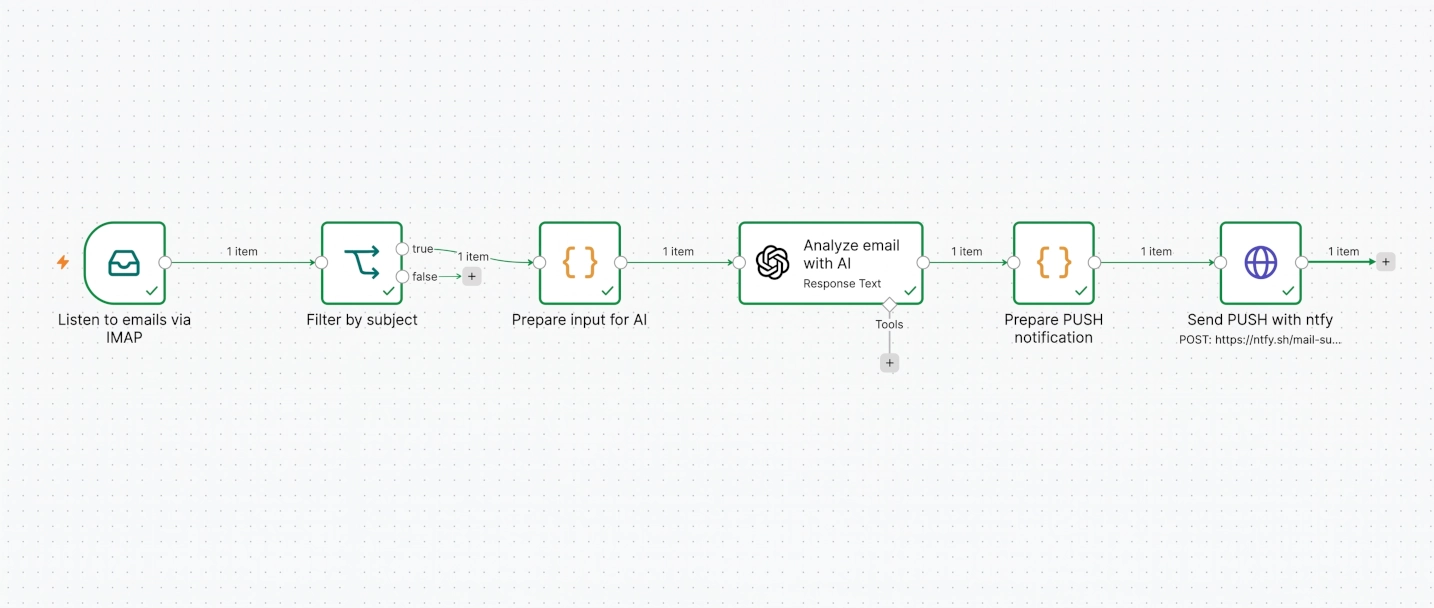
Import this file into your n8n instance to deploy the full workflow. You'll need to configure your IMAP credentials, your OpenAI API key, and your ntfy channel URL.
DescargarIf you want to go deeper into n8n, follow our series on the topic
to learn how to use it properly.
What we’d do differently if we started today
If we had to name one single takeaway from this entire project, it probably wouldn’t have anything to do with AI.
It would have to do with documentation.
When we started, we thought that giving the assistant all the available information about WorkIO would be enough for it to respond correctly. We were wrong.
At the beginning, we gathered the documentation as it existed at the time: loose files, no defined structure, scattered text we’d been generating over the years as developers. Technical notes here, feature descriptions there, an unfinished FAQ somewhere else. There was no connection between the documents, no clear logic to guide the assistant toward what it needed in any given moment. It was information written for us, not for an AI.
The results were predictable: the assistant answered, but badly. Sometimes it mixed up information from different versions of the app. Other times it gave too much context when a simple answer would have done. And sometimes it missed the most relevant information because it was buried among sections that had nothing to do with the question.
What fixed it wasn’t a single clean redesign — it was a much messier process: test, watch where the assistant stumbled, reorganise a bit, test again. Several iterations, several partial restructurings, until at some point we committed to a full overhaul of the internal documentation. That’s when things started to click.
The key was to stop adding documentation indiscriminately and start organising it with a logic built for the assistant, not for us.
How to structure documentation for an AI assistant
Instead of one giant document with everything mixed together, we split the knowledge into small, specialised blocks, each one focused on a very specific purpose. One document for the product’s general concepts. Another written specifically to introduce WorkIO to new users, from that angle alone. Separate documentation for each platform: Android, iPhone, and the web version. A dedicated document for frequently asked questions. Another one focused on explaining specific actions within the app. And additional documentation for particular features when the complexity justified it.
But splitting them wasn’t enough. We also gave each document explicit instructions about its own role: it defines clearly when it should be used, what kind of questions it answers, and which ones it should leave to more specialised documents. That separation prevents contradictions and makes the knowledge base much easier to maintain as the product evolves — without a change in one section breaking answers in another.
The improvement was immediate. We didn’t switch AI models. We didn’t increase parameters or invest in a more expensive solution. We simply reorganised the information so the assistant could find the right context for each situation, and the responses improved noticeably.
These are straightforward changes to implement, but they make an enormous difference in the medium term.
Wrapping up
If there’s one idea we’d leave you with after everything we’ve covered, it’s this:
An assistant’s intelligence doesn’t depend solely on the model it uses — it depends on how well the knowledge it can access is organised.
We’ve been working with AI applied to support for a while now, and the biggest surprise hasn’t been the model’s capabilities. It’s how decisive that prior work of organising information well turns out to be. It’s not glamorous. It’s not what makes headlines. But it’s what makes everything else work.
Many organisations already have the information an AI assistant would need — it’s just scattered across documents, manuals, FAQs, emails, and wikis. The real challenge usually isn’t generating more documentation. It’s turning that scattered knowledge into a coherent, structured, and maintainable base. That’s a point that goes well beyond WorkIO and applies to any team looking to automate support without losing quality in the process.
We keep iterating, keep reviewing every conversation, keep improving the documentation. It’s not a process that ends — but it is one that pays back the investment, with interest, over time.
If this article was useful to you, a second part probably makes sense: how to build an AI assistant with your own documentation from scratch, the architecture we used, and how we structured the full knowledge base for a real product. If there’s enough interest, we’ll publish it. The most direct way to let us know is to share it and spread the word.
Automating support isn’t about answering more emails. It’s about freeing up time to focus on the problems that actually need a real person’s attention.
Happy hacking!!