At BetaZetaDev we like getting ahead of the curve, and one of our goals is to bring you the future of web browsing before it becomes the present. What you’re reading right now is exactly that kind of preview: we’ve put it through its paces, broken it, and we’re here to tell you how it works so you don’t have to wait until everyone else is talking about it.
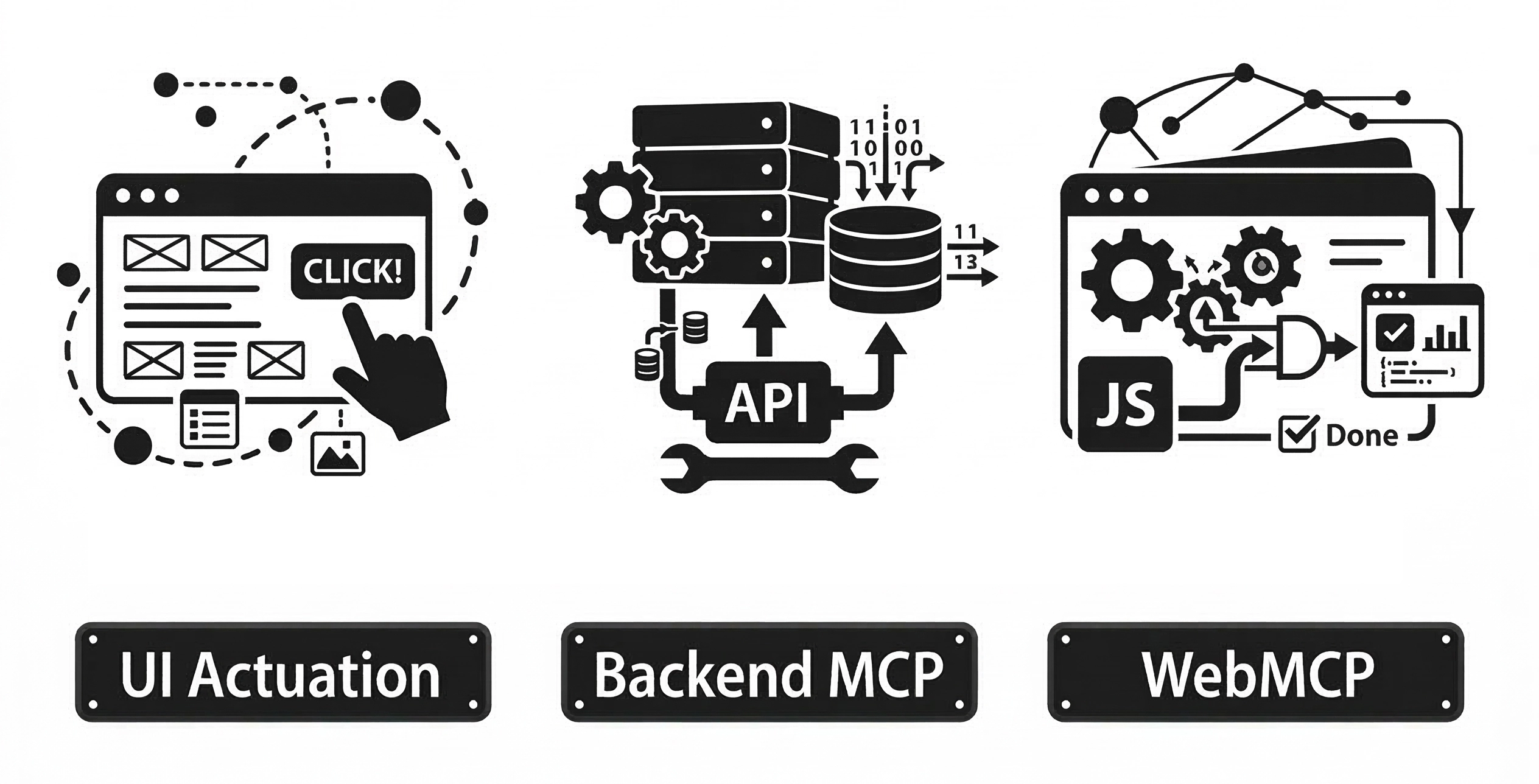
If you’ve been following the AI agents space for a while, you already know that one of the big unsolved problems is how these agents interact with arbitrary web pages. Until now, two dominant approaches have emerged — neither of them ideal. The first is UI actuation: the agent simulates clicks, fills in forms, and presses buttons as if it were a human user. It works, but it’s slow, fragile, and breaks whenever the design changes. The second is backend integration: you expose your functionality through an MCP server or an OpenAPI spec so the agent can consume it. This works really well, but it requires implementation and ongoing maintenance on the server side.
On February 27, 2026, the W3C Web ML Community Group published a draft proposing a third way: WebMCP. The interesting part? The logic lives on the frontend, reusing code that’s already there.
What exactly is WebMCP?
WebMCP is a proposal from the W3C Web ML Community Group that allows a web page to register JavaScript functions as “tools” accessible by AI agents running in the browser. Instead of having the agent figure out how to navigate the interface, or having the server expose an API, the page itself says: “hey, here’s what I can do — use it.”
The document was published as a Draft Community Group Report on February 27, 2026. It is not yet an official W3C standard — worth emphasizing — but it is a formal proposal with serious editors behind it: Brandon Walderman from Microsoft and Khushal Sagar and Dominic Farolino from Google. You can try it today through the Chrome Early Preview Program; Firefox and Safari don’t support it yet.
How it works: registering tools in the browser
The API is surprisingly straightforward. The page accesses navigator.modelContext and calls registerTool() once for each capability it wants to expose. Each tool has:
- A name identifier
- A description in natural language (used by the agent to decide when to call it)
- An input schema in JSON Schema format
- An
executefunction containing the actual logic, which receives the agent’s input and aclientobject
  if ("modelContext" in navigator) {
    navigator.modelContext.registerTool({
      name: "add-item",
      description: "Adds a new item to the list",
      inputSchema: {
        type: "object",
        properties: {
          name: { type: "string", description: "Item name" },
          description: { type: "string", description: "Optional description" }
        },
        required: ["name"]
      },
      annotations: { readOnlyHint: false },
      execute(input) {
        addItem(input.name, input.description);
        // Response format must be an object with a 'content' array
        return {
          content: [{ type: "text", text: `"${input.name}" successfully added.` }]
        };
      }
    });
  }
The agent discovers the available tools when the page loads, invokes them with the appropriate parameters, and receives the results. The most elegant part of the design is that the execute function calls existing JavaScript code directly on the page. No translation layer, no intermediate server, no transport protocol.
It’s also worth noting that unregisterTool(name) exists to remove tools dynamically — useful when the page state changes and certain actions are no longer available.
Human-in-the-Loop: a design that keeps humans in control
One of the most interesting — and sensible — aspects of the proposal is how it handles potentially destructive actions. Before an agent can do something irreversible (make a purchase, send a message, delete data), the API provides requestUserInteraction(), which pauses the agent’s execution and runs a callback where the developer defines what confirmation to ask from the user.
  execute: async (input, client) => {
    // client.requestUserInteraction takes a callback that performs the interaction
    await client.requestUserInteraction(async () => {
      return confirm(`Confirm purchase of product ${input.productId}?`);
    });
    return await purchase(input.productId, input.quantity);
  }
Notice that requestUserInteraction isn’t on navigator.modelContext but on client, the second parameter passed to the execute function. This object represents the agent executing the tool, and delegating confirmation through it is what closes the control loop between agent and user.
This design rests on a sound premise: agents are powerful tools, but ultimate control should stay in the user’s hands. We’re not talking about blind automation — this is supervised automation.
WebMCP vs. MCP: complementary, not competing
It’s easy to mix them up since they share a name and a philosophy, but they operate at different layers of the ecosystem:
| Aspect | MCP (Model Context Protocol) | WebMCP |
|---|---|---|
| Where it runs | Backend server | User’s browser |
| Transport | JSON-RPC + stdio/HTTP | No transport layer |
| Primitives | Tools, Resources, Prompts | Tools only |
| Implementation | Requires a server | Reuses frontend code |
| Discovery | Explicit client configuration | On page navigation |
| Use cases | APIs, databases, system tools | Interaction with the current UI |
WebMCP intentionally aligns with MCP’s “tools” format, making it easy for both to coexist in the same agent ecosystem. The key difference is that WebMCP needs no server: the browser acts as the mediator, and the page decides what it exposes.
Practical example: a task list controlled by an AI agent
The best way to understand WebMCP isn’t to read the spec — it’s to look at the complete code of a real page that implements it. Let’s build a small task management app from scratch that an AI agent can fully control using natural language.
Prerequisites
Since this is experimental technology, Chrome enforces security restrictions you need to meet for the demo to work:
-
Install Chrome Canary: You need a recent dev build (v146+). You can download it from the official page.
-
Enable the flags: Go to
chrome://flags/and enable the following three (search by name or identifier):- Experimental Web Platform features (
#enable-experimental-web-platform-features) - WebMCP support in DevTools (
#devtools-webmcp-support) - WebMCP for testing (
#enable-webmcp-testing)
Restart the browser after enabling them.
- Experimental Web Platform features (
-
Install the extension: Download and install Model Context Tool Inspector, which acts as the agent to invoke registered tools.
-
Secure environment: The page must be served over HTTPS or via localhost. Opening the
.htmlfile directly from disk (file://) won’t work. From the folder containing the file, run:
python3 -m http.server 8080
Then open http://localhost:8080 in Chrome Canary.
The demo page
The page is a simple task manager in plain HTML + JavaScript, with no external dependencies. Copy this code, save it as index.html, and serve it locally. It exposes four tools:
list-tasks— returns current tasks with their statuscreate-task— creates a new taskcomplete-task— marks a task as donedelete-task— permanently removes a task
  <!DOCTYPE html>
  <html lang="en">
  <head>
    <meta charset="UTF-8">
    <title>Task Manager — WebMCP Demo</title>
    <style>
      body { font-family: sans-serif; max-width: 600px; margin: 40px auto; padding: 0 20px; line-height: 1.6; background-color: #f7fafc; }
      .container { background: white; padding: 30px; border-radius: 12px; box-shadow: 0 4px 6px rgba(0,0,0,0.1); }
      h1 { border-bottom: 2px solid #edf2f7; padding-bottom: 15px; color: #2d3748; margin-top: 0; }
      ul { list-style: none; padding: 0; margin: 20px 0; }
      li { background: #fff; margin-bottom: 12px; padding: 15px; border-radius: 8px; display: flex; justify-content: space-between; border: 1px solid #e2e8f0; }
      .status-box { margin-top: 30px; padding: 15px; border-radius: 8px; font-size: 0.9rem; border: 1px solid transparent; }
      .detected { background-color: #e6fffa; border-color: #38b2ac; color: #234e52; }
      .not-detected { background-color: #fff5f5; border-color: #feb2b2; color: #742a2a; }

      /* ── MCP tool action animations ── */
      li { transition: background 0.3s, border-color 0.3s; }

      @keyframes glowCreate {
        0%   { box-shadow: 0 0 0 0 #48bb78; background: #f0fff4; border-color: #48bb78;
              transform: translateY(-6px); opacity: 0; }
        20%  { transform: translateY(0); opacity: 1; }
        40%  { box-shadow: 0 0 22px 6px rgba(72,187,120,0.55); }
        100% { box-shadow: none; background: #fff; border-color: #e2e8f0; }
      }
      @keyframes glowComplete {
        0%   { box-shadow: 0 0 0 0 #4299e1; }
        25%  { box-shadow: 0 0 22px 6px rgba(66,153,225,0.55); background: #ebf8ff; border-color: #4299e1; }
        100% { box-shadow: none; background: #ebf8ff; border-color: #bee3f8; }
      }
      @keyframes glowDelete {
        0%   { box-shadow: none; opacity: 1; max-height: 80px; margin-bottom: 12px; padding: 15px; }
        20%  { box-shadow: 0 0 22px 6px rgba(252,129,129,0.55); background: #fff5f5; border-color: #fc8181; opacity: 0.7; }
        65%  { opacity: 0; max-height: 80px; }
        100% { opacity: 0; max-height: 0; margin-bottom: 0; padding: 0 15px; border-width: 0; }
      }
      @keyframes glowList {
        0%   { box-shadow: none; }
        35%  { box-shadow: 0 0 16px 4px rgba(236,201,75,0.6); background: #fffff0; border-color: #ecc94b; }
        100% { box-shadow: none; background: #fff; border-color: #e2e8f0; }
      }

      .anim-create   { animation: glowCreate  2.2s ease-out forwards; }
      .anim-complete { animation: glowComplete 2.2s ease-out forwards; }
      .anim-delete   { animation: glowDelete   1.8s ease-out forwards; }
      .anim-list     { animation: glowList     1.4s ease-out forwards; }
    </style>
  </head>
  <body>
    <div class="container">
      <h1>My tasks</h1>
      <ul id="list"></ul>
      <div id="status" class="status-box">Checking WebMCP...</div>
    </div>

    <script>
      let tasks = [
        { id: 1, text: "Read the WebMCP specification", done: false },
        { id: 2, text: "Set up local demo", done: false },
      ];

      function renderItem(t) {
        const li = document.createElement("li");
        li.dataset.id = t.id;
        li.innerHTML = `<span style="text-decoration:${t.done ? 'line-through' : 'none'}">
            <strong>[${t.id}]</strong> ${t.text}
          </span>
          <span>${t.done ? '✅' : '⏳'}</span>`;
        return li;
      }

      function render() {
        const ul = document.getElementById("list");
        ul.innerHTML = "";
        tasks.forEach(t => ul.appendChild(renderItem(t)));
      }
      render();

      function getItemEl(id) {
        return document.querySelector(`#list [data-id="${id}"]`);
      }

      function pulseItem(el, cls) {
        el.classList.remove(cls);
        void el.offsetWidth; // force reflow so animation restarts
        el.classList.add(cls);
      }

      const createResponse = (txt) => ({ content: [{ type: "text", text: txt }] });
      const statusEl = document.getElementById("status");

      if ("modelContext" in navigator) {
        statusEl.className = "status-box detected";
        statusEl.innerHTML = "<strong>✅ WebMCP detected:</strong> The agent can interact with this page.";

        navigator.modelContext.registerTool({
          name: "list-tasks",
          description: "Returns all tasks with their ID, text and status (done or pending).",
          inputSchema: { type: "object", properties: {} },
          annotations: { readOnlyHint: true },
          execute() {
            const items = document.querySelectorAll("#list li");
            items.forEach((el, i) => {
              setTimeout(() => {
                pulseItem(el, "anim-list");
                el.addEventListener("animationend", () => el.classList.remove("anim-list"), { once: true });
              }, i * 80);
            });
            const txt = tasks.map(t => `[${t.id}] ${t.text} (${t.done ? 'Done' : 'Pending'})`).join('\n');
            return createResponse(txt || "No tasks.");
          }
        });

        navigator.modelContext.registerTool({
          name: "create-task",
          description: "Creates a new pending task in the list.",
          inputSchema: {
            type: "object",
            properties: { text: { type: "string", description: "Description of the task to create" } },
            required: ["text"]
          },
          execute(input) {
            const n = { id: Math.max(0, ...tasks.map(t => t.id)) + 1, text: input.text, done: false };
            tasks.push(n);
            const li = renderItem(n);
            document.getElementById("list").appendChild(li);
            requestAnimationFrame(() => requestAnimationFrame(() => {
              pulseItem(li, "anim-create");
              li.addEventListener("animationend", () => li.classList.remove("anim-create"), { once: true });
            }));
            return createResponse(`Task "${input.text}" added with ID ${n.id}.`);
          }
        });

        navigator.modelContext.registerTool({
          name: "complete-task",
          description: "Marks a task as done given its ID.",
          inputSchema: {
            type: "object",
            properties: { id: { type: "number", description: "ID of the task to complete" } },
            required: ["id"]
          },
          async execute(input, client) {
            const targetId = Number(input.id); // Needed: agents sometimes pass IDs as strings
            const t = tasks.find(x => x.id === targetId);
            if (!t) return createResponse(`Error: no task found with ID ${targetId}.`);

            if (client?.requestUserInteraction) {
              await client.requestUserInteraction(async () => {
                if (!confirm(`Mark as done: "${t.text}"?`)) throw "Cancelled by user";
              });
            }
            t.done = true;
            const el = getItemEl(targetId);
            if (el) {
              el.querySelector("span:first-child").style.textDecoration = "line-through";
              el.querySelector("span:last-child").textContent = "✅";
              pulseItem(el, "anim-complete");
              el.addEventListener("animationend", () => el.classList.remove("anim-complete"), { once: true });
            }
            return createResponse(`Task [${targetId}] marked as done.`);
          }
        });

        navigator.modelContext.registerTool({
          name: "delete-task",
          description: "Permanently deletes a task given its ID.",
          inputSchema: {
            type: "object",
            properties: { id: { type: "number", description: "ID of the task to delete" } },
            required: ["id"]
          },
          async execute(input, client) {
            const targetId = Number(input.id);
            const index = tasks.findIndex(x => x.id === targetId);
            if (index === -1) return createResponse(`Error: no task found with ID ${targetId}.`);

            const { text } = tasks[index];
            if (client?.requestUserInteraction) {
              await client.requestUserInteraction(async () => {
                if (!confirm(`Permanently delete "${text}"? This action cannot be undone.`)) throw "Cancelled by user";
              });
            }
            const el = getItemEl(targetId);
            if (el) {
              pulseItem(el, "anim-delete");
              el.addEventListener("animationend", () => {
                el.remove();
                tasks.splice(tasks.findIndex(x => x.id === targetId), 1);
              }, { once: true });
            } else {
              tasks.splice(index, 1);
            }
            return createResponse(`Task "${text}" deleted.`);
          }
        });

      } else {
        statusEl.className = "status-box not-detected";
        statusEl.innerHTML = "<strong>❌ WebMCP not detected.</strong> Make sure you are using Chrome Canary with the flag enabled and serving the page from localhost.";
      }
    </script>
  </body>
  </html>
How to interact with the page
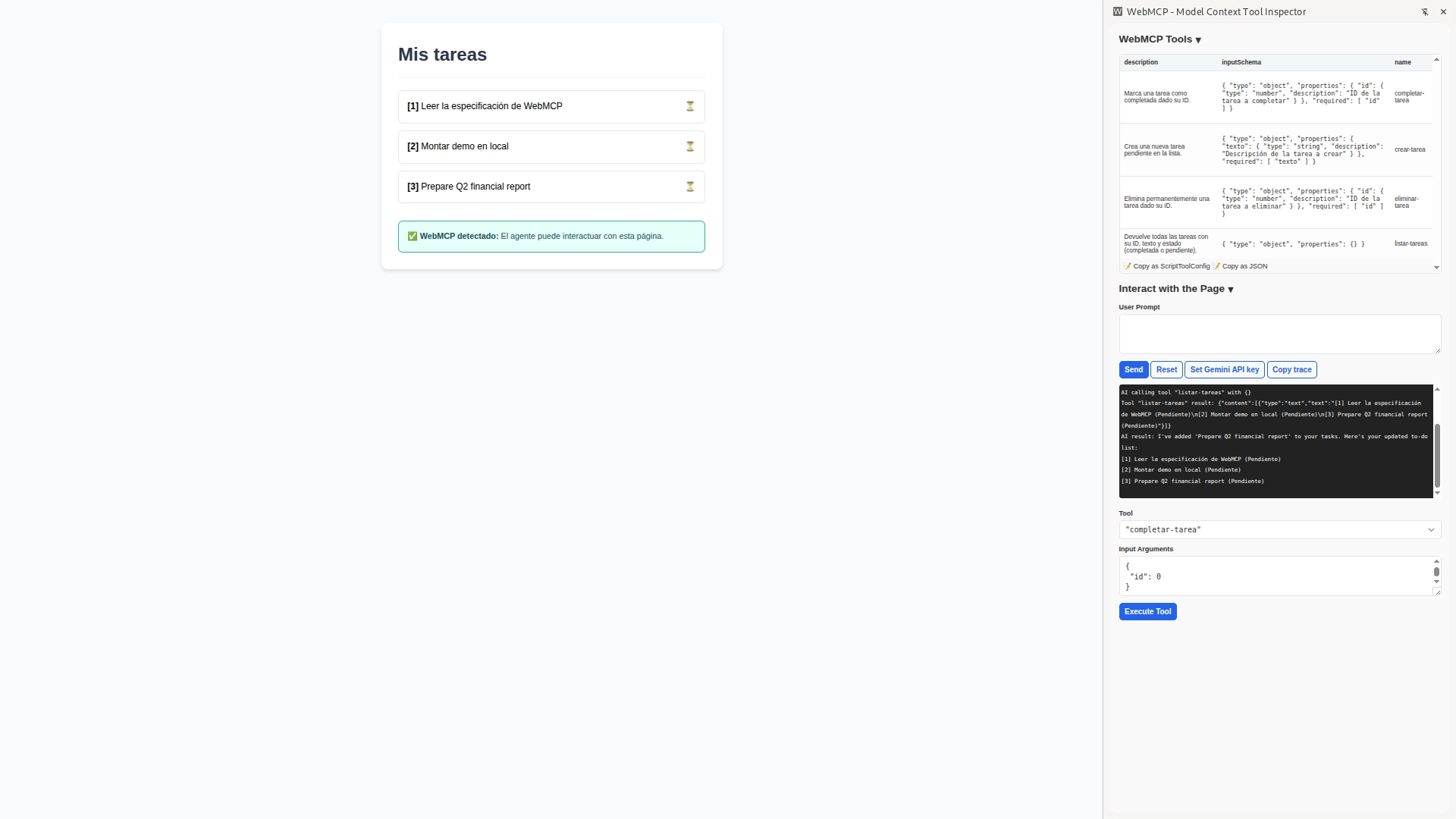
When you open this page in Chrome Canary with WebMCP enabled, the Model Context Tool Inspector extension automatically detects the registered tools. There are two ways to test the system:
1. Manual Interaction (Debug Mode)
At the bottom of the extension panel, you’ll see a Tool selector and an Input Arguments field. This is perfect for developers verifying that functions respond correctly. You can select create-task, pass it a JSON like {"text": "Review Monday's PR"}, and click Execute Tool to see the raw technical output.
2. Natural Language Interaction (User Prompt)
This is where WebMCP shows its real potential. If you configure a Gemini API Key in the extension, you can use the User Prompt field to talk to the page:
- “What tasks do I have pending?” → the agent calls
list-tasksand returns the list. - “Add a task to review Monday’s PR” → calls
create-task, and the UI updates instantly. - “Mark task 1 as complete” → calls
complete-task, asking the user for confirmation first. - “Delete all completed tasks” → the agent reasons through it and calls
delete-tasksequentially for each one.
In this mode, you’re not telling the agent which function to call — you’re just telling it what you want to achieve. The agent analyzes the descriptions of the registered tools and decides which one(s) to invoke to fulfill your request.
Why it works this way and not another
Here’s something worth dwelling on: the agent has no idea there’s a <ul> in the HTML, and it doesn’t need to. It isn’t parsing the DOM for buttons or simulating clicks. The only thing it knows is the tool contract — names, descriptions, and JSON schemas. This makes the integration genuinely robust: you can redesign your entire visual interface, and as long as you don’t change the WebMCP tool contracts, the agent will keep working perfectly.
The key insight in this example is the use of requestUserInteraction() on state-modifying operations. Without that call, complete-task would execute without the user ever getting a say. This is what sets WebMCP apart from a plain automation script: the design assumes the human stays in the loop for the decisions that matter.
For a read-only action like list-tasks, asking for confirmation makes no sense — hence readOnlyHint: true in its annotations. For anything that mutates data, it does. This distinction is the developer’s responsibility — the spec doesn’t enforce it automatically — which makes tool design a product decision, not just a technical one.
There’s also a practical gotcha we discovered while testing: type coercion matters. Agents sometimes pass IDs as strings even when the schema declares type: "number". Using Number(input.id) explicitly prevents tools from failing silently on a "1" === 1 comparison.
Current limitations: still a draft
Before getting too excited, let’s be honest about where things stand:
- The security spec is marked as TODO. This is concerning for an API that allows external agents to execute code on behalf of the user. How this gets resolved will be critical.
- It doesn’t work headless. If the agent doesn’t have a visible browser window, it can’t use WebMCP. This limits its usefulness in server-side automation pipelines.
- Discovery only happens on page load. The agent can’t “browse” available tools until the user actually navigates to that specific URL.
- Chrome only, for now. Firefox and Safari don’t support it yet, which severely limits real-world reach until broader adoption follows.
That said, having Microsoft and Google co-editing the spec together is a strong signal that the interest here is serious.
Why you should keep an eye on this
The way agents interact with the web is changing. For years, agents relied on scraping and UI automation — techniques that work but are inherently brittle, like trying to drive while only looking in the rearview mirror.
WebMCP points toward something different: websites designed to be used by both humans and agents. Not as two separate interfaces, but as a single layer of business logic that both can invoke. If this proposal matures and gains adoption, it will reshape how we think about frontend architecture: we won’t just be designing visual components anymore — we’ll be designing invocable tools.
The practical implications are already taking shape:
- Per-tool permissions and auditing: you’ll need to think carefully about what an agent can and can’t do on your site, with the same rigor you’d apply to API permissions
- “Agent-friendly” websites: just like accessibility and SEO, agent-friendliness could become a genuine competitive advantage
- Frontend logic reuse: the code that already works for your users can work for agents too, without rewriting a thing
Conclusion
Until now, your options were to teach the agent to click like a human or build a server to expose your capabilities. WebMCP adds a third path: the page hands over its own tools, directly from the browser, reusing the JavaScript code you already have.
It’s still a draft — with unresolved security questions and support limited to Chrome — but the direction is clear, and the players behind it are significant enough to take seriously. The task list demo we walked through barely scratches the surface: imagine an online store exposing search-product, add-to-cart, or check-availability, or a banking app exposing view-balance and make-transfer with mandatory confirmation. The pattern scales to any domain.
If you want to follow the proposal’s development, you can do so at the official repository: webmachinelearning/webmcp.
Happy Hacking!